MOSS-Image Has Four Things to Get Right

A Useful AI Image Needs More Than Attractive Detail. Explore How MOSS-Image Approaches Visual Quality, Readable Text, Deliberate Composition, and Generation Speed, With Clear Explanations of Its Published Results, Practical Settings, and the Tradeoffs That Matter When Choosing an Image Model.
An AI-generated poster can look impressive and still fail. The illustration might be sharp, but the headline has a typo. The words might be correct, but the layout feels crowded. Even a good result becomes less useful if producing another version takes too long.
MOSS-Image, often searched as “Moss Image,” is an open image-generation family from OpenMOSS. Its five-billion-parameter image backbone supports photography, anime styles, bilingual text, and structured layout instructions. Understanding it means looking at four connected qualities: how the image looks, what its words say, how its elements fit together, and how long generation takes.
Image Quality Starts With More Than Resolution
Sharpness is easy to notice. Quality also depends on believable lighting, coherent shapes, and details that survive a closer look. A larger image gives those details more space without automatically making them correct.
The MOSS-Image user guide recommends one to two million output pixels for Base, including 1M, 1.5M, and 2M settings. It also describes extrapolation to approximately four million pixels. These are output options, not guarantees that every larger result will look better.
Sampling matters too. A sampling step is one update in the process that builds the picture. The Base guide recommends at least 50 steps for best results and warns that changing guidance settings can trade realistic appearance against stable detail.
There are two main versions: MOSS-Image-Base and MOSS-Image-SFT. SFT means supervised fine-tuning; it adapts Base using curated data. They share an architecture, but that does not mean their outputs are interchangeable. A useful quality comparison should identify the version and settings before judging the picture.
MOSS-Image Text Rendering Has a Specific Strength
Text makes image quality less subjective. An attractive face can be interpreted in different ways; an event date or product name needs to be right.
MOSS-Image supports Chinese and English text rendering. OpenMOSS's whiteboard examples show how writing can coexist with a person and a photographic scene. Its SFT example also illustrates more organized text grouping than the accompanying Base example.
| MOSS-Image-Base | MOSS-Image-SFT |
|---|---|
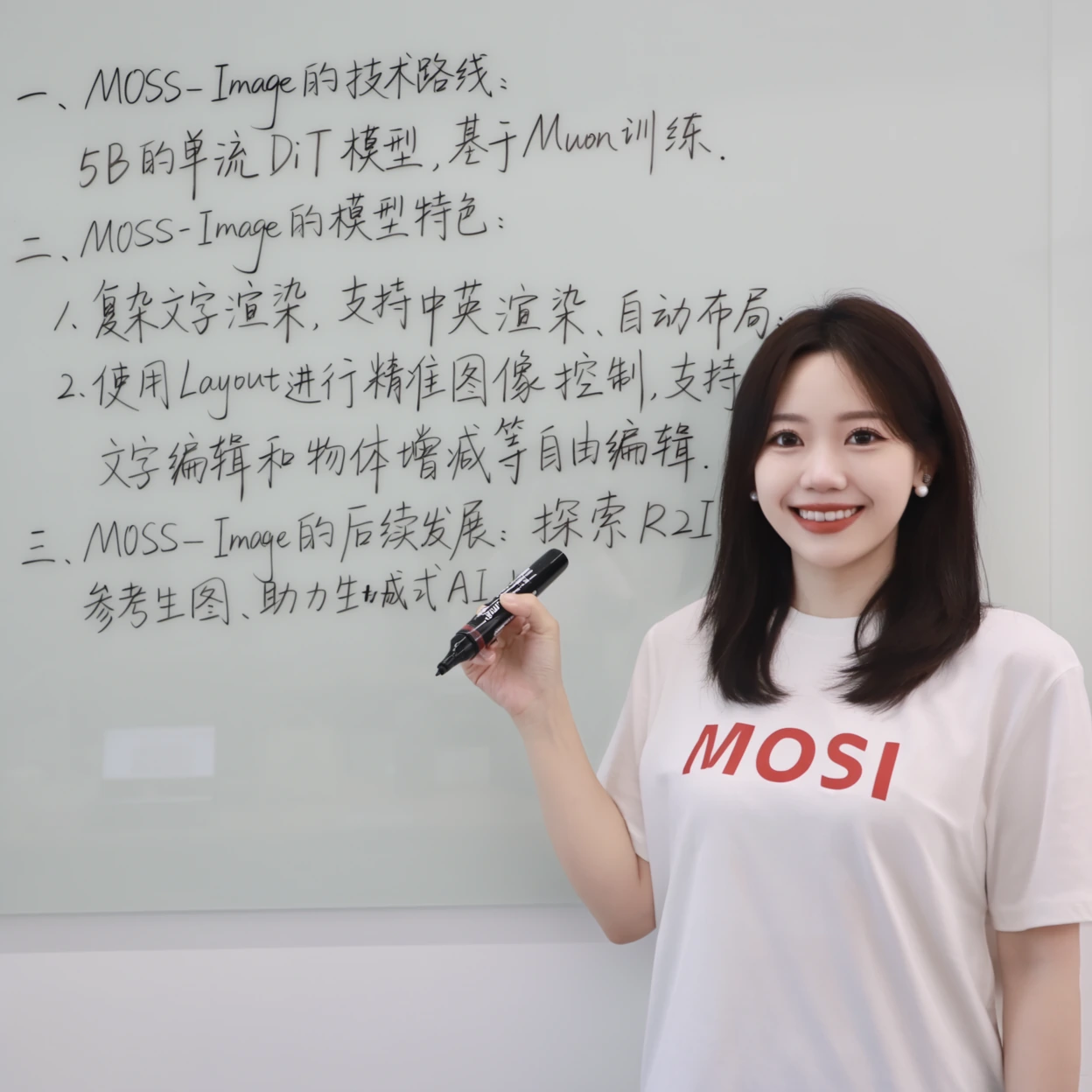 | 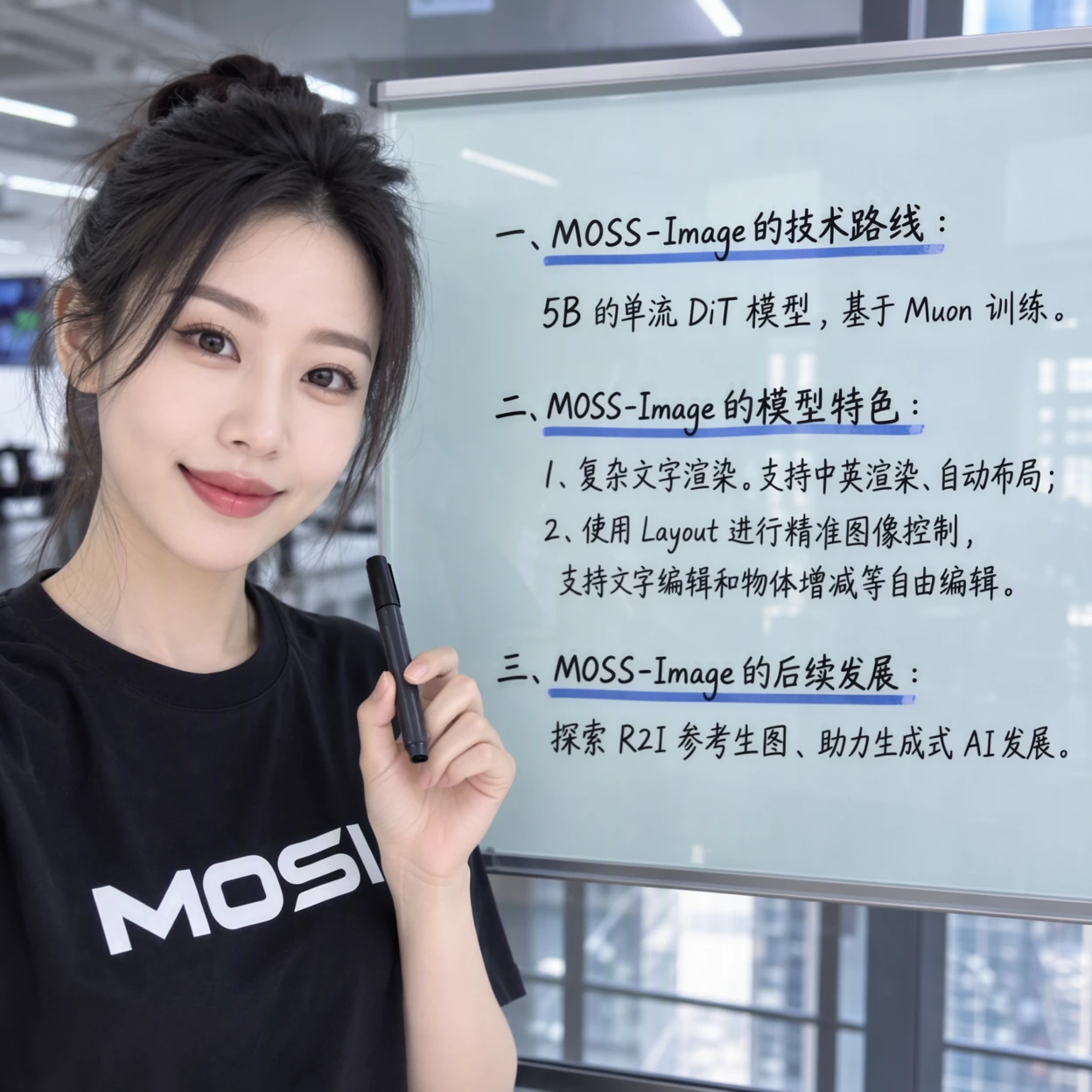 |
Developer examples, supplied by OpenMOSS. They illustrate these particular outputs, not an independent PicEditor comparison.
The developer's technical report reports 96.3% Mean-6 coverage on LongLongTextBench, an English-and-Chinese text-rendering evaluation. Coverage measures recognized target words or characters. It does not check their order or directly penalize additional recognized text, so it is not a 96.3% exact-copy accuracy claim.
For practical prompting, provide the literal wording and explicit line breaks when wrapping matters. Then inspect names, numbers, punctuation, and reading order. A high coverage score cannot replace proofreading a finished graphic.
Composition Turns Objects Into a Design
Composition concerns relationships: where the headline sits, whether the subject has room, and how the viewer's eye moves through the image. Correct objects can still make an awkward arrangement.
MOSS-Image accepts natural-language prompts and JSON layouts. JSON is structured text; here it can describe individual objects, literal text, and bounding boxes marking their intended positions and sizes.
Imagine a travel poster with a title at the top and a mountain beneath it. A descriptive prompt names those elements. A layout specification also reserves space for each, making the intended hierarchy more explicit.
The developer's 7Bench results help distinguish two measurements:
| MOSS-Image Benchmark | Reported Score | Meaning |
|---|---|---|
| Mean overlap for detected objects | 0.8786 | Placement agreement among objects with positive detected overlap |
| Mean overlap across all target objects | 0.6788 | Includes missed objects as zero |
Overlap measures how closely detected boxes match requested boxes; higher is better. The difference shows why “precise placement” should not become a promise that every requested object appears correctly.
The official project also describes prompt-based layout changes. Those regenerate an image from revised instructions. The current backbone does not directly edit an uploaded reference image, and the user guide labels layout prompting experimental. Spatial control helps guide a design; it does not guarantee finished typography or aesthetic balance.
MOSS-Image Speed Depends on the Setup
The 5B backbone sounds compact, but parameter count alone cannot tell you how many seconds an image takes. The text encoder, output dimensions, sampling configuration, GPU, and memory strategy all matter.
The official SFT model card uses 50 inference steps by default. Its standard guidance performs two transformer passes per step. Consequently, “50 steps” describes computation settings, not elapsed time.
Memory settings add another tradeoff. The official repository offers GPU-resident, component-offload, and sequential modes. Offloading moves model components between CPU and GPU memory; sequential mode reduces GPU-memory use with slower inference.
As of October 20, 2026, the official materials reviewed here do not establish one standard seconds-per-image figure. A meaningful speed result should identify the checkpoint, GPU, resolution, steps, and memory mode, and distinguish loading time from generation after loading.
The Base guide describes few-step distillation as work in progress. Distillation aims to make a model generate with fewer steps. Any accelerated derivative should be evaluated as its own configuration, including whether its speed changes text fidelity or visual detail.
Which Tradeoffs Matter for Your Images?
For an illustrated scene, inspect lighting and structural detail. For a poster, add exact wording, hierarchy, and spacing. When generating many variations, measure time to a usable result as well as time per image: retries also consume time.
MOSS-Image pricing is separate from these quality questions. Official weights are available under Apache 2.0, while local hardware or hosted compute still has a cost. The reviewed OpenMOSS materials do not list an official per-image API rate as of October 20, 2026.
MOSS-Image brings text and layout into the same generation task as the picture itself. Its published evidence makes those abilities worth exploring. The useful test is whether a chosen configuration delivers the detail, correct copy, coherent composition, and turnaround your particular image needs.