
AI Food Photography for Real Food, Better PhotographyAI Food Photography
Keep the dish recognizable while improving the lighting, background, tone, and photographic atmosphere.
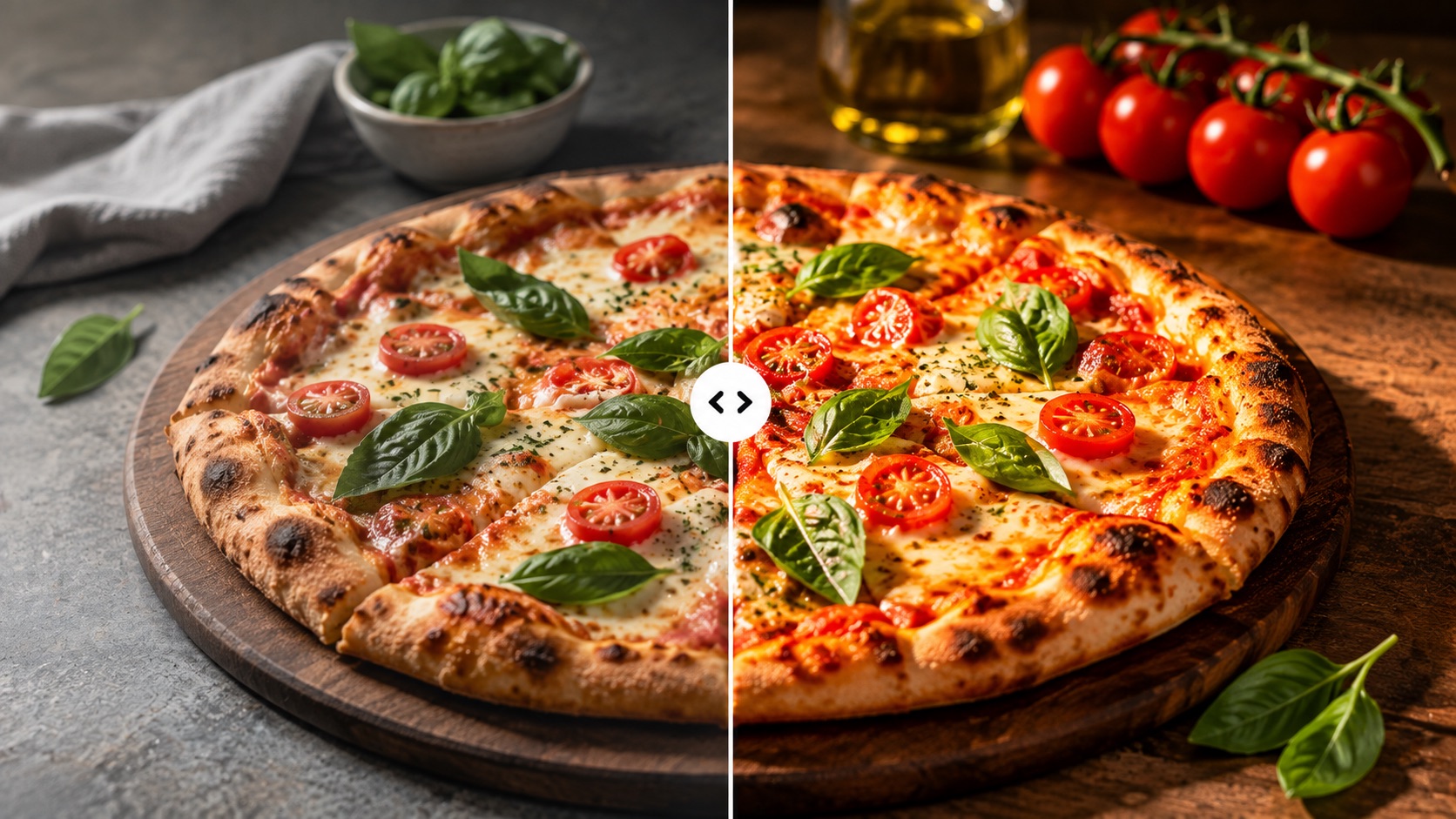
AI Food Photography Generator Online starts from your uploaded dish rather than inventing one from text. AI Food Photography Online Free workflows let you test different photography moods while keeping the food itself consistent. AI Food Photography Generator from Photo is useful for restaurants, cafes, creators, and publishers who need better visuals of real dishes. AI Food Photography from Photo focuses on the same ingredients, portions, toppings, garnish, and plating, while AI Food Photo Enhancer processing improves the surrounding photographic treatment. A Free AI Food Photography Generator can help you compare styles before preparing a larger set of menu or content images.
AI Image Tools
Everything You Need to Edit Photos Faster
Open the PicEditor AI tools library for background removal, photo enhancement, object cleanup, face swap, upscaling, and more focused image workflows.

AI Portrait Retouching

Snatched Waist Editor

AI Facial Expression Changer

AI Texture Generator

AI Nose Piercing Filter

Replace Object in Photo Online

Add Object to Photo

Eyeliner Filter

AI Bust Down Filter

Image Splitter

Add White Background to Photo

Snapchat Text Remover

Realistic AI Skin Generator

Add speech bubble to photo

Change Photo Background

AI Clothes Wrinkle Remover

AI LinkedIn Profile Picture

GPT Transparent BG Image Editor

Image to Layers

3D Angle Editor

Change Background of Photo
Add Text to Image
Speech Bubble Meme Generator
AI Image Darkener
AI Food Photography: Make Real Dish Photos Look Professional
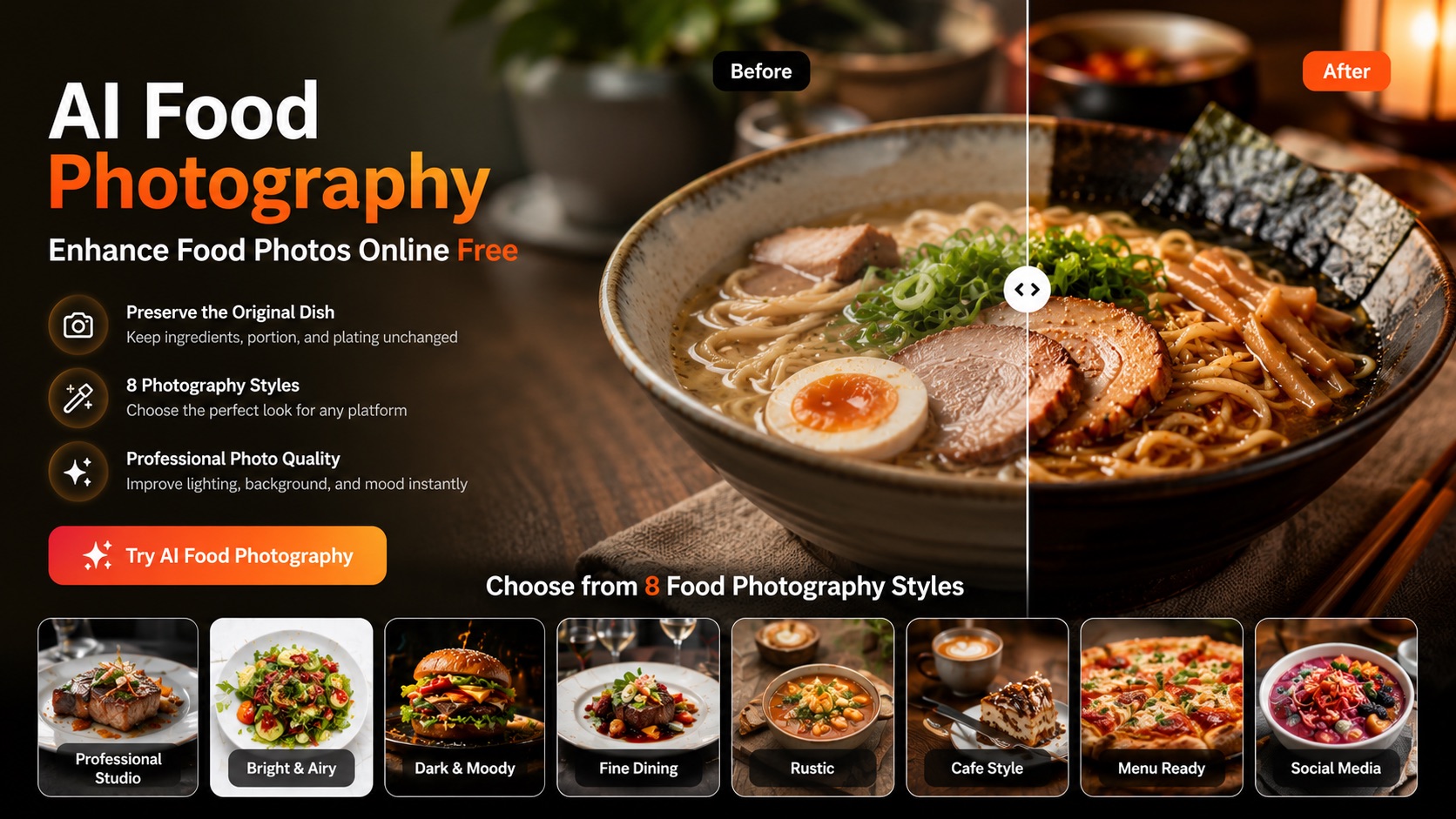
Improve an existing food photo without changing the dish itself. Upload your image, choose a photography style, and create a cleaner, more professional result with realistic lighting, background, and atmosphere.
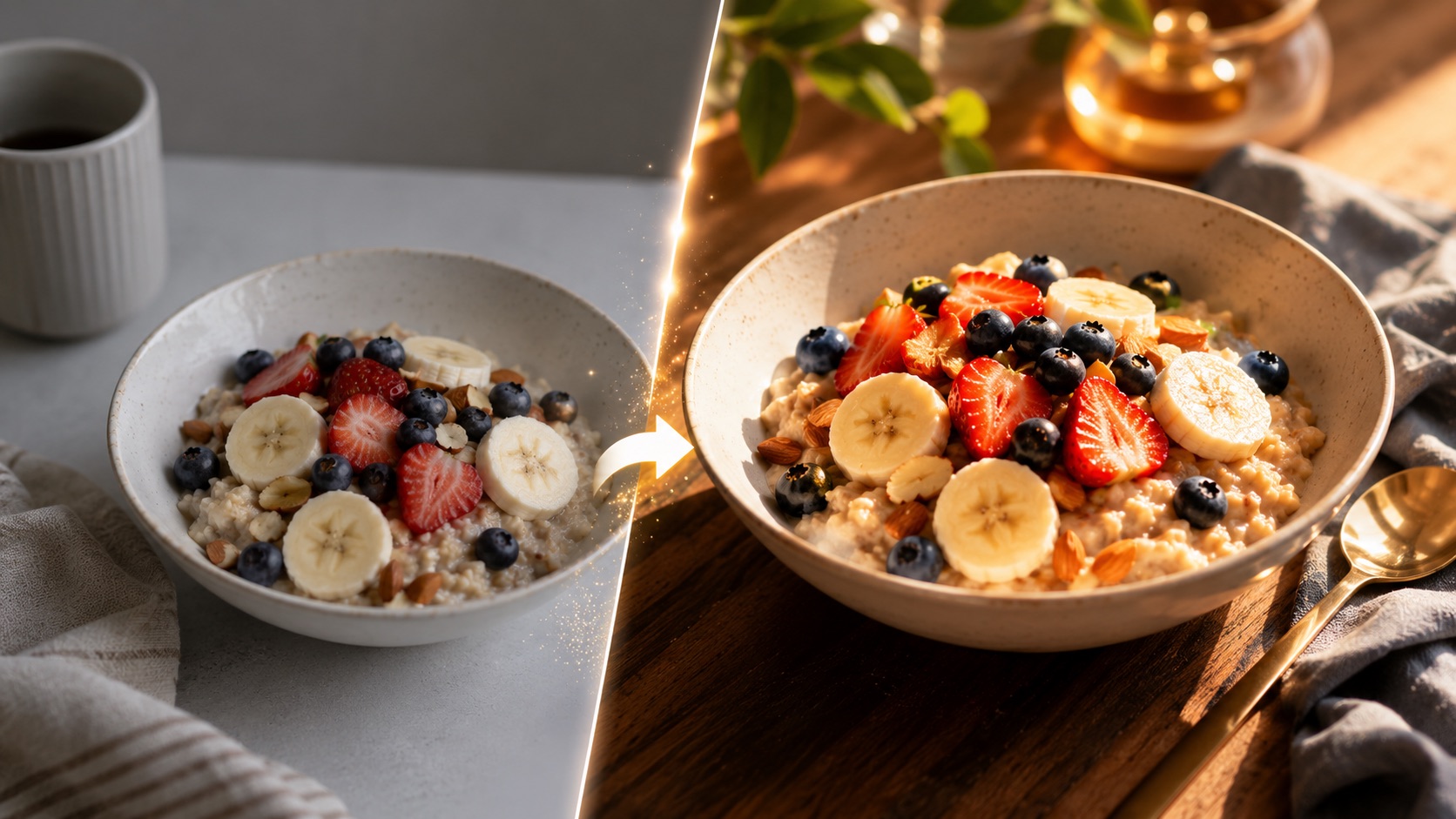
AI Food Photography improves how your real dish is photographed while keeping its ingredients, portion, plating, garnish, and food arrangement consistent. AI Food Photo Enhancer processing refines lighting, tone, texture, and depth, while AI Food Photo Editor styling changes only the photographic look around the food.
How to Use AI Food Photography in 3 Steps
AI Food Photography follows a simple workflow: upload a real food photo, choose a photography style and output settings, then click Generate Image. AI Food Photography Generator Online makes it possible to restyle an existing dish photo without writing a prompt or rebuilding the meal.

Upload Your Food Photo
Start AI Food Photography by uploading a clear photo of the dish you want to improve. Drag and drop a JPG or PNG, click to upload, or select an image from your Assets Library. The uploaded image becomes the visual reference for the result. AI Food Photo Enhancer processing works best when the dish is visible and not heavily covered, because the goal is to preserve the real food rather than replace it.

Choose a Food Photography Style
Choose Professional Studio, Bright & Airy, Dark & Moody, Fine Dining, Rustic, Cafe Style, Menu Ready, or Social Media. AI Food Photography uses the selected style to guide lighting, background, tabletop mood, color treatment, and depth of field. It does not need to redesign the meal. AI Food Photo Editor styling controls the photographic direction, while AI Food Photo Enhancer processing keeps the original dish visually consistent.

Generate the Restyled Food Photo
Click Generate Image to create the result. AI Food Photography keeps the source dish as the reference and improves the photography around it. The ingredients, portions, toppings, garnish, sauce placement, and plating should remain as close to the original as possible. Review the result and use the image that best matches your menu, recipe, campaign, or social content.
AI Food Photography That Preserves the Real Dish
AI Food Photography is designed for users who want better food imagery without replacing the food itself. AI Food Photo Enhancer processing improves photographic quality, while AI Food Photo Editor styling helps control the mood around the dish. The core idea is simple: same food, better photography.
Improve the Photo Without Recreating the Dish
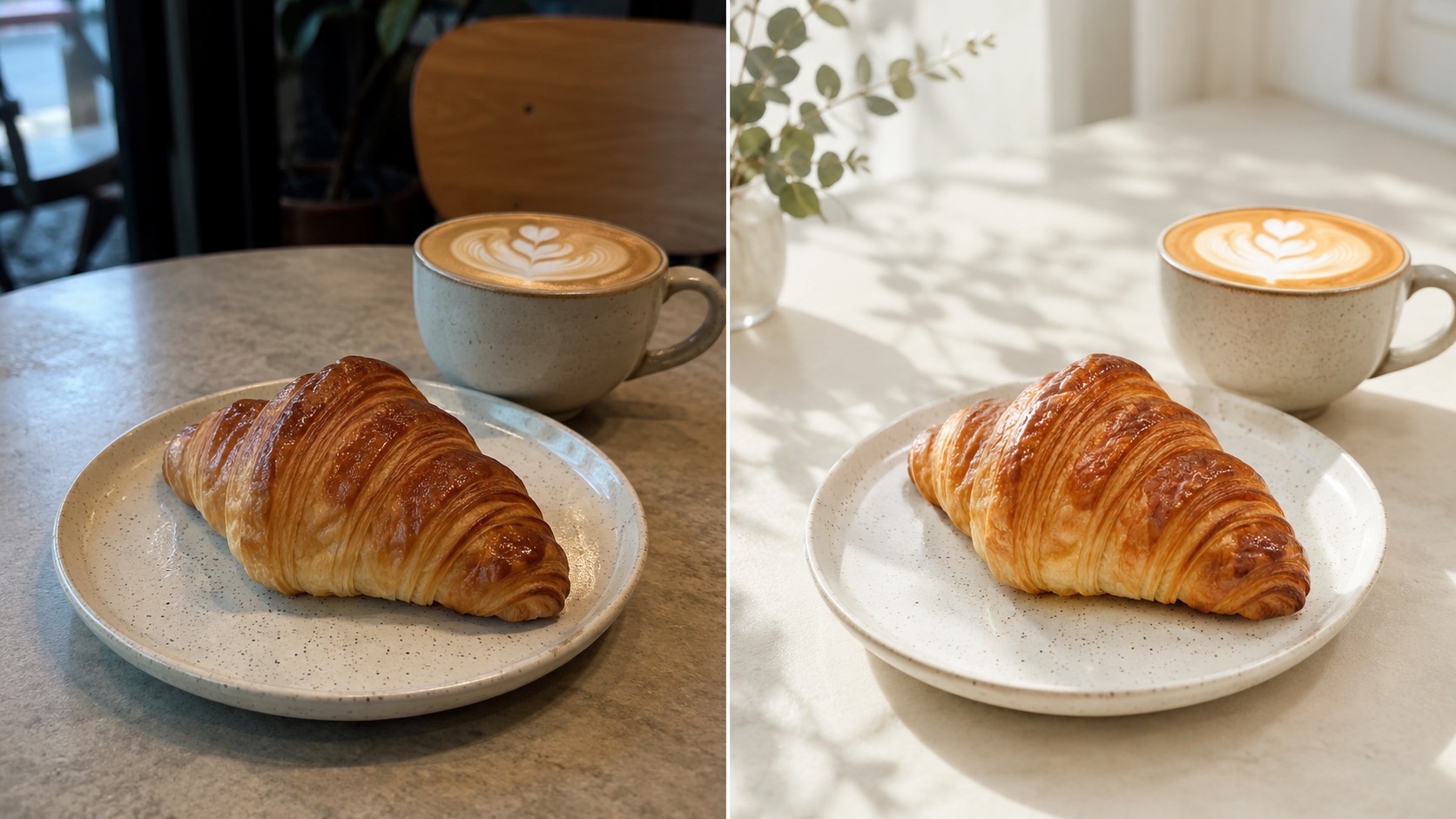
AI Food Photography is useful when the food is already right but the photo is not. A casual phone image may have flat light, dull color, distracting surroundings, or weak depth. Instead of inventing a different meal, AI Food Photography keeps the real dish at the center of the result. AI Food Photo Enhancer processing improves light balance, contrast, texture, and photographic depth while preserving the ingredients and portion. This makes AI Food Photography from Photo practical for real menus, delivery listings, recipes, and promotional content where the image should still represent the food customers will actually receive.
Change Photography Mood While Keeping Food Consistent
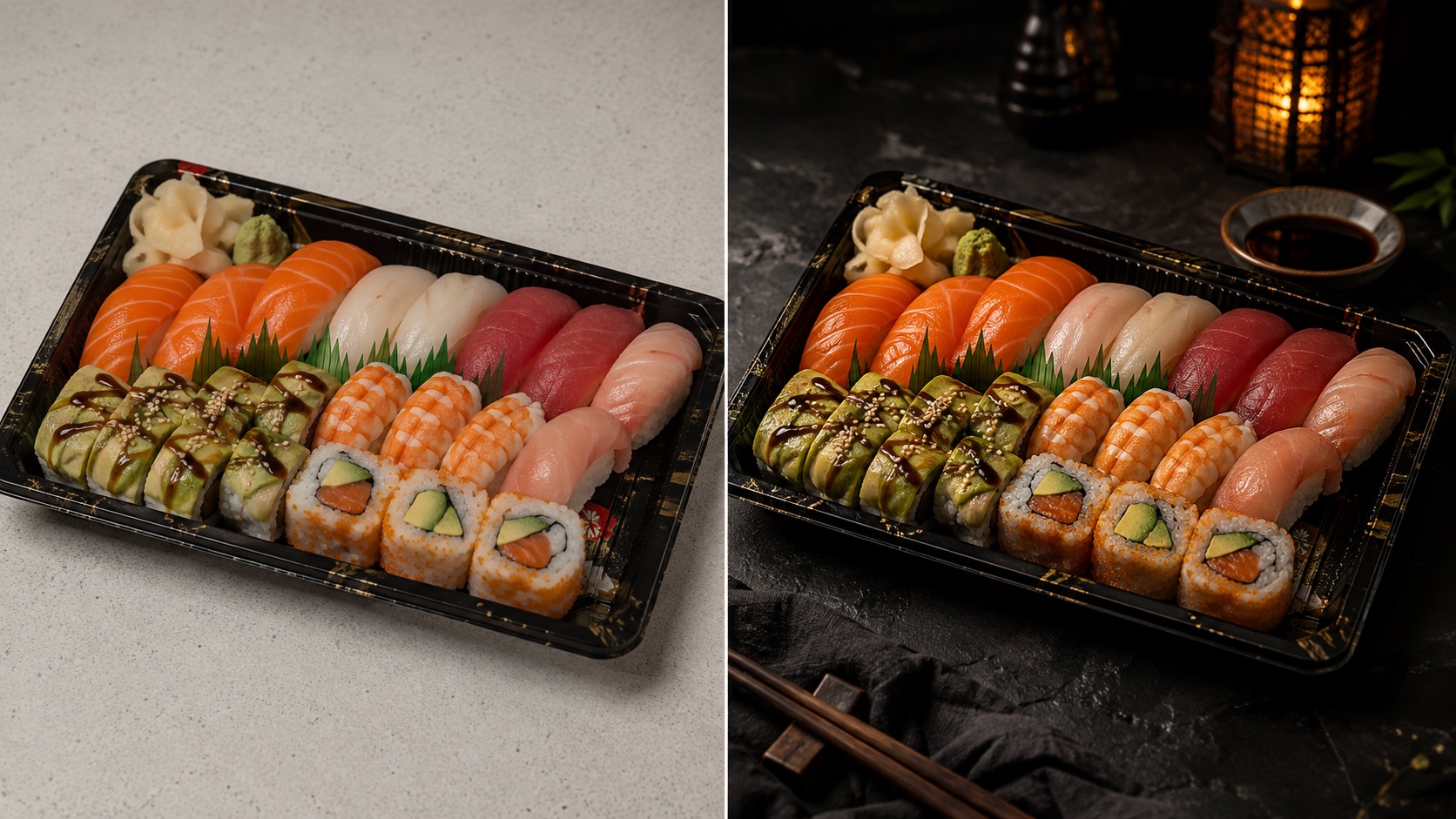
AI Food Photography lets the same dish appear in different photographic moods without asking the model to redesign the food. Professional Studio can create a clean commercial look, Bright & Airy can add soft daylight, and Dark & Moody can introduce deeper shadows and richer contrast. AI Food Photo Editor styling changes the surrounding photographic treatment rather than the recipe. AI Food Photo Enhancer processing helps textures stay natural. AI Food Photography Generator from Photo is especially useful when you want several visual directions while keeping the same ingredients, garnish, plating, and portion visible.
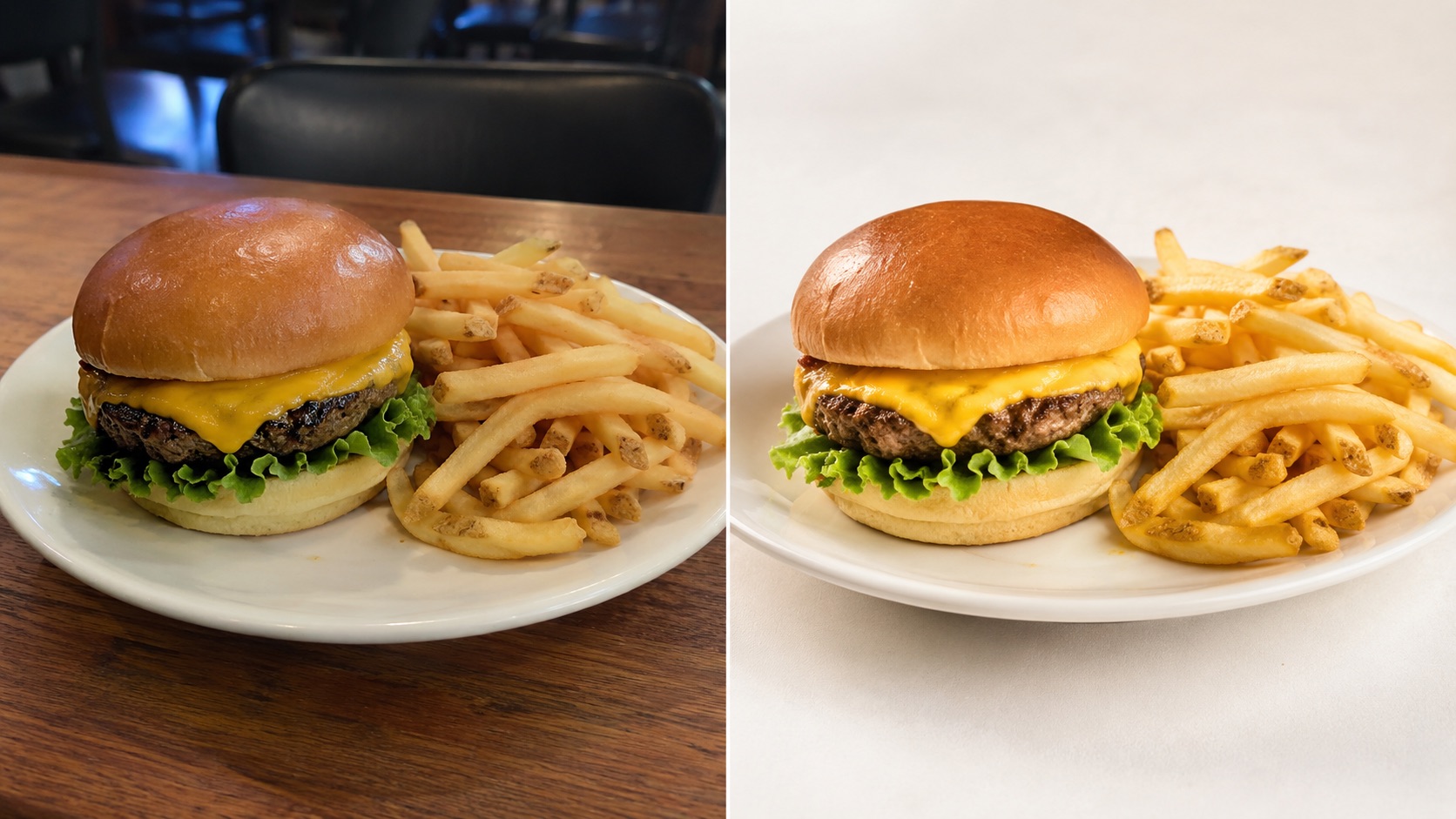
Keep Menu Images Honest and Recognizable
AI Food Photography can help food businesses improve visual quality without turning a simple dish into something they do not serve. AI Food Photography should preserve the number of food items, toppings, sauces, garnish, cooking appearance, portion size, and overall plating. AI Food Photo Enhancer processing focuses on photographic qualities such as exposure, shadows, highlights, white balance, and detail. A Free AI Food Photography Generator can be used to test how a real dish looks under a cleaner photography treatment before you update a larger menu or content library.
Who Can Use AI Food Photography?
AI Food Photography supports restaurants, cafes, food creators, recipe publishers, and other users who already have a real dish photo and want better photography rather than a different meal. AI Food Photo Enhancer processing and AI Food Photo Editor styling work around the source image so AI Food Photography remains focused on faithful visual improvement.

Restaurant Menus and Delivery Listings
Restaurants can use AI Food Photography to make menu photos from different phones or lighting conditions feel more consistent while keeping each dish recognizable. AI Food Photography from Photo starts with the real menu item rather than a text description. AI Food Photo Enhancer processing can improve brightness, contrast, texture, and background separation without adding ingredients that are not served. AI Food Photography Generator Online is useful for giving burgers, noodles, desserts, drinks, and plated meals a more coordinated visual direction across menu pages and delivery listings.

Cafes, Bakeries, and Small Food Businesses
AI Food Photography can polish everyday images of coffee, pastries, bread, desserts, sandwiches, and seasonal specials while retaining the original product. Bright & Airy, Rustic, and Cafe Style can change lighting and atmosphere without changing what was baked or served. AI Food Photo Enhancer processing helps improve visual clarity and texture. AI Food Photography Online Free access is useful for testing a few images before choosing a consistent direction for a cafe menu, social feed, or promotional campaign.

Food Creators and Social Media Teams
Creators can use AI Food Photography when a real meal has already been photographed but the image needs a stronger visual mood. AI Food Photography can improve lighting, color treatment, background atmosphere, and depth while leaving the food itself consistent. AI Food Photo Editor styling is useful for moving between clean studio, cafe, or social-media looks. AI Food Photo Enhancer processing helps preserve natural texture. A Free AI Food Photography Generator can help compare styles before selecting the final image for posts, thumbnails, or campaign visuals.

Recipe Publishers and Food Bloggers
Recipe publishers can use AI Food Photography to refresh older images without changing the meal readers expect from the recipe. AI Food Photography Generator from Photo works from the existing dish image, making it suitable for archives where ingredients and plating should remain recognizable. AI Food Photo Enhancer processing can improve lighting, contrast, and perceived detail while keeping the food structure consistent. AI Food Photography Online Free testing can also help publishers compare visual treatments before applying a new editorial direction across multiple recipe pages.
What Users Say About AI Food Photography
Users choose AI Food Photography when they want stronger food imagery without losing the identity of the real dish. AI Food Photo Enhancer processing improves photographic quality, while AI Food Photo Editor styling changes the visual mood around the food. AI Food Photography keeps faithful representation at the center of the workflow.
I used AI Food Photography on pastry photos taken quickly at our cafe counter. The Bright & Airy style improved the light and background without turning the pastries into different products. AI Food Photo Enhancer processing brought out the layers and surface texture while the shapes and toppings stayed recognizable. That was important because I wanted better photos of what we actually sell, not idealized replacements.
I used AI Food Photography on pastry photos taken quickly at our cafe counter. The Bright & Airy style improved the light and background without turning the pastries into different products. AI Food Photo Enhancer processing brought out the layers and surface texture while the shapes and toppings stayed recognizable. That was important because I wanted better photos of what we actually sell, not idealized replacements.
Our menu photos came from several phones, so the lighting was inconsistent. AI Food Photography gave them a more unified visual direction while keeping the same dishes. Menu Ready worked well for listings, and Fine Dining created a richer mood for signature plates. AI Food Photo Enhancer processing improved the finish without changing ingredients, portions, or garnish. The results still looked like the food our kitchen serves.
Our menu photos came from several phones, so the lighting was inconsistent. AI Food Photography gave them a more unified visual direction while keeping the same dishes. Menu Ready worked well for listings, and Fine Dining created a richer mood for signature plates. AI Food Photo Enhancer processing improved the finish without changing ingredients, portions, or garnish. The results still looked like the food our kitchen serves.
I publish recipes often, and some older images have weak lighting even though the dishes themselves are fine. AI Food Photography lets me improve those photos without creating a new version of the recipe. AI Food Photo Editor styling helps me match the editorial mood, while AI Food Photo Enhancer processing improves clarity and depth. AI Food Photography Generator from Photo is useful because the original dish remains the reference.
I publish recipes often, and some older images have weak lighting even though the dishes themselves are fine. AI Food Photography lets me improve those photos without creating a new version of the recipe. AI Food Photo Editor styling helps me match the editorial mood, while AI Food Photo Enhancer processing improves clarity and depth. AI Food Photography Generator from Photo is useful because the original dish remains the reference.
I tested AI Food Photography with a burger photo taken under poor indoor lighting. Dark & Moody made the scene feel more intentional, but the burger itself stayed recognizable. AI Food Photo Enhancer processing improved the texture and light without adding extra toppings or making the portion larger. That kind of restraint is exactly what I want from food photography for real marketing content.
I tested AI Food Photography with a burger photo taken under poor indoor lighting. Dark & Moody made the scene feel more intentional, but the burger itself stayed recognizable. AI Food Photo Enhancer processing improved the texture and light without adding extra toppings or making the portion larger. That kind of restraint is exactly what I want from food photography for real marketing content.


AI Food Photography FAQs
Learn how AI Food Photography handles real dish photos, style presets, food preservation, and menu use. AI Food Photography is intended to improve the way food is photographed while keeping the source meal recognizable and visually faithful.
Upload a real food photo, choose a photography style, select your output settings, and click Generate Image. AI Food Photography uses the uploaded dish as the visual reference and improves the photography around it.
AI Food Photography is designed to keep the dish as close to the source as possible, including ingredients, toppings, garnish, portion, and plating. Small generative differences can still occur, but the workflow is intended to preserve the food rather than redesign it.
You can choose Professional Studio, Bright & Airy, Dark & Moody, Fine Dining, Rustic, Cafe Style, Menu Ready, or Social Media. AI Food Photography uses the selected style to change photographic mood, not the recipe.
Use a clear photo where the main dish is visible. AI Food Photography from Photo works best when ingredients, plating, and the overall food shape can be clearly identified in the source image.
Yes. AI Food Photography Generator Online is well suited to restaurant menus because it starts from the real dish. AI Food Photo Enhancer processing can improve presentation while helping the image remain representative of the menu item.
AI Food Photo Enhancer focuses on photographic qualities such as lighting, contrast, tone, and detail. AI Food Photo Editor styling refers to changing the visual photography treatment around the existing dish rather than freely editing its ingredients or structure.
Improve Real Dish Photos with AI Food Photography
Upload a real dish photo, choose a style, and use AI Food Photography to improve lighting, atmosphere, and photographic quality without intentionally changing the food. AI Food Photo Enhancer processing helps create a cleaner, more professional result from the image you already have.
