
Turn an authorized selfie into an original gothic bride portrait. Static image editing with your own creative direction.
AI Image Tools
Everything You Need to Edit Photos Faster
Open the PicEditor AI tools library for background removal, photo enhancement, object cleanup, face swap, upscaling, and more focused image workflows.
AI Blemish Remover

FLUX 3 Image Klein

Ideogram 4.5

AI Portrait Retouching

Snatched Waist Editor

AI Facial Expression Changer

AI Texture Generator

AI Nose Piercing Filter

Replace Object in Photo Online

Add Object to Photo

Eyeliner Filter

AI Bust Down Filter

Image Splitter

Add White Background to Photo

Snapchat Text Remover

Realistic AI Skin Generator

Add speech bubble to photo

Change Photo Background

AI Clothes Wrinkle Remover

AI LinkedIn Profile Picture

GPT Transparent BG Image Editor

Image to Layers

3D Angle Editor
Corpse Bride AI Filter for Gothic Bride Portraits
Your Face, An Original Gothic Fantasy
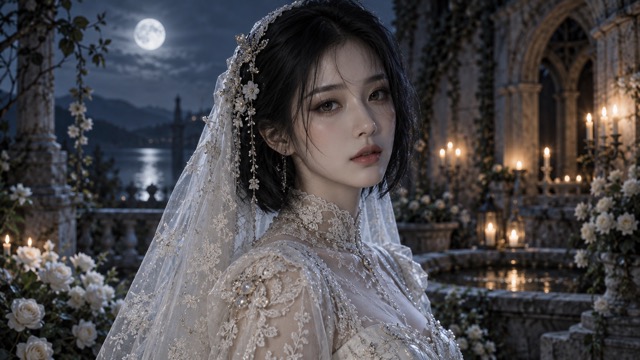
Turn your selfie into an original gothic bride portrait with delicate lace, blue-tinted fantasy makeup, and a handcrafted doll aesthetic. This corpse bride filter uses AI image editing to explore dark romantic character art while aiming to keep your recognizable features. Add your own creative direction, review the result, and download a static image. Artwork shown is AI-generated style illustration, not verified Nano Banana 2 output.
How To Use The Corpse Bride Filter
Start with an authorized adult portrait, guide the styling, then review your image. The corpse bride AI filter creates static artwork; results depend on your photo and prompt.

Upload Your Selfie
Upload a clear photo of yourself or an adult who has authorized its use. Choose even lighting, a visible face, and an unobstructed expression. Avoid heavy beauty filters and group shots so the corpse bride filter has a clear identity reference.

Generate Your Gothic Portrait
Describe the makeup, veil, clothing, background, and lighting you want. Use one of the copyable prompts below or write your own direction. Generate with Nano Banana 2, then check facial details before refining your corpse bride AI filter result.

Download Your Image
Open the finished image and inspect the face, lace, hands, and edges. Download the version you prefer, or adjust one detail and generate again. Your corpse bride filter portrait is a static picture ready for a thoughtful crop and personal presentation.
Original Gothic Bridal Details
Shape your corpse bride AI filter portrait with specific visual choices. These AI-generated style illustrations are not verified outputs from the configured model.
Selfie To Gothic Bride
A clear source helps the corpse bride filter follow your face. Request an original gothic bride-inspired portrait while keeping your expression. The corpse bride AI filter cannot guarantee identical features.
Blue-Tinted Fantasy Makeup
Describe blue-gray shading, defined eyes, and warm candlelight. The corpse bride filter applies artistic makeup, not a permanent skin change. Keep the blue skin AI filter effect subtle.
Delicate Lace And Bridal Details
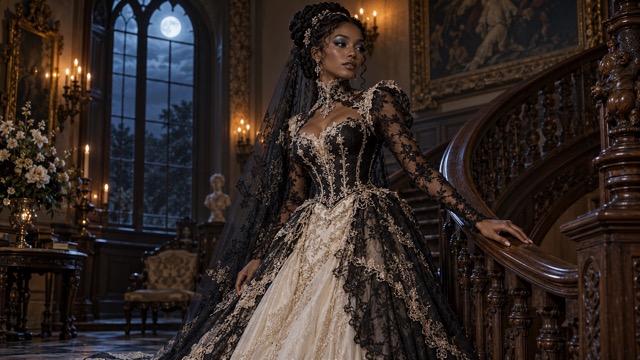
Specify embroidery, translucent lace, and antique jewelry in your corpse bride filter prompt. The corpse bride AI filter explores original Victorian-inspired bridal fashion without copying official film costumes.
Handcrafted Doll Aesthetic
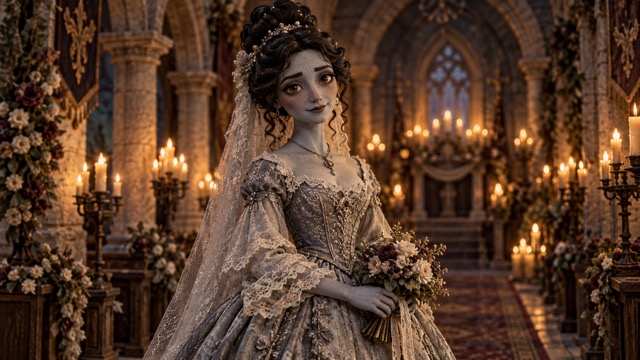
A stop motion doll filter look combines tactile clay, painted shading, and woven fabrics. This corpse bride filter direction creates a handmade appearance in a still portrait, without animation.
Preserve Your Facial Identity
Ask the corpse bride AI filter to retain your eyes, nose, mouth, and hairstyle. Compare your corpse bride filter result with the source; reduce stylization if resemblance drifts.
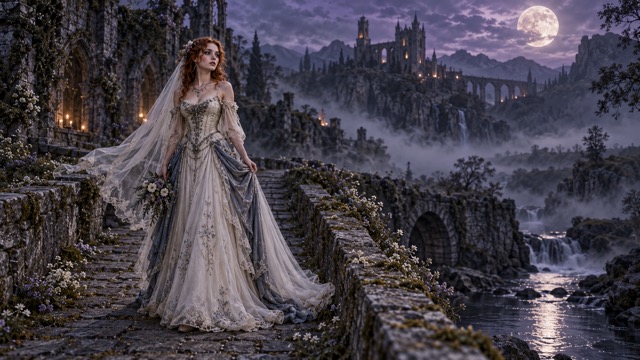
Moonlit Gothic Backgrounds
Set your corpse bride filter portrait in a moonlit garden, courtyard, or library. Describe one coherent setting. Background changes use prompt instructions, without a dedicated automatic replacement button.
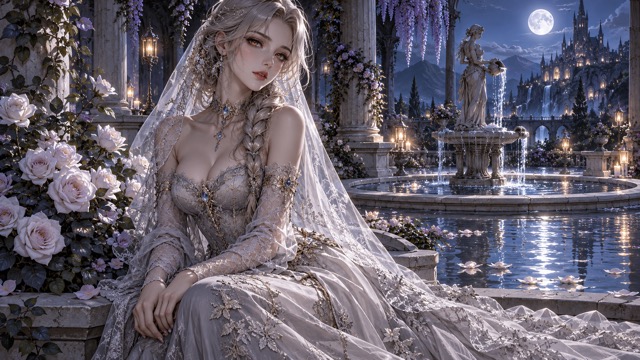
Realistic And Illustrated Styles
Request photography, illustration, or anime through the corpse bride AI filter prompt. Explore Photo To Anime for another direction. Style and resemblance vary between attempts.
Halloween And Fantasy Portraits
Use the corpse bride filter for Halloween or year-round art. Crop around the face for avatars. For broader transformations, describe your idea in the AI Photo Editor.
Creative Gothic Portrait Ideas
Use the corpse bride filter for personal art and original character exploration. Choose a purpose before writing your prompt.

Gothic Halloween Portraits
Build a seasonal corpse bride filter portrait with pale flowers, cool makeup, and a quiet mysterious expression.

Fantasy Bridal Photography
Explore an original fantasy wedding portrait, using lace and candlelight to suggest an imagined ceremony rather than real event photography.
Stop-Motion-Inspired Characters
Develop a handcrafted character with the corpse bride AI filter, using tactile fabrics and restrained doll-like styling.

Gothic Profile Pictures
Keep the face large and the background simple so your corpse bride filter image reads clearly at avatar size.
Dark Academia Portraits
Place antique bridal clothing in a library setting. Warm lamps and arched windows give a gothic bride photo filter direction depth.
Fantasy Character Design
Use the corpse bride filter as a starting point for an original story character, then refine costume and personality details.
Cosplay Inspiration
Try original lace, jewelry, and makeup combinations with the corpse bride AI filter before planning a physical costume.
Romantic Fantasy Illustrations
Combine moonlight, pale roses, and original architecture for a dark fantasy portrait with a calm romantic mood.

Halloween Social Media Posts
Create a corpse bride filter image for seasonal posts. Check small details and label AI-created content when appropriate.
Creative AI Photo Editing
Explore prompt-led changes in clothing, lighting, and setting. Keep one visual priority per revision for more useful comparisons.
Illustrative Creative Reactions
Demonstration placeholders only. These short aesthetic reactions are not real customer reviews or verified generation experiences.
Soft moonlight gives the concept a quiet romantic mood.
Soft moonlight gives the concept a quiet romantic mood.
Fine lace makes the costume feel carefully considered.
Fine lace makes the costume feel carefully considered.
The handmade textures suit an expressive fantasy character.
The handmade textures suit an expressive fantasy character.
Cool makeup and warm candlelight create an appealing contrast.
Cool makeup and warm candlelight create an appealing contrast.
A clear face keeps the portrait personal and readable.
A clear face keeps the portrait personal and readable.
The original garden setting complements the delicate veil.
The original garden setting complements the delicate veil.
Corpse Bride AI Filter FAQ
Practical answers about the corpse bride filter, reference photos, originality, and image creation.
A corpse bride filter describes gothic bridal styling: cool fantasy makeup, lace, and dark romance. This page creates original portraits rather than movie replicas.
The corpse bride AI filter uses Nano Banana 2 image editing with your uploaded photo and written direction to generate an original static portrait.
Upload an authorized selfie, describe the look, and generate. Review your corpse bride filter result and simplify the prompt if facial details drift.
Yes. This corpse bride AI filter is configured for one source image. A sharp, evenly lit adult portrait provides the clearest identity reference.
Use a clear face, natural expression, and uncluttered composition. Avoid sunglasses, blurred photos, harsh shadows, and existing filters that obscure facial structure.
The corpse bride filter aims to retain recognizable features, but identity is not guaranteed. Strong stylization and difficult source photos can change resemblance.
Yes. Describe subtle blue-gray makeup in the corpse bride AI filter prompt. This is a visual treatment within the image, not a physical change.
Ask the corpse bride filter for translucent lace, fine embroidery, and an original veil design. Inspect fabric edges and intersections after generation.
It suggests handcrafted materials, painted shading, and miniature costume textures. The corpse bride filter renders this appearance in a still image, without animation.
Yes. Give the corpse bride AI filter your own costume, expression, and setting. Avoid copying recognizable characters, official accessories, or promotional compositions.
Describe photography, illustration, or anime in your prompt. The corpse bride filter interprets those directions; exact style and resemblance may vary.
Describe a garden, courtyard, library, or wedding hall in your corpse bride AI filter prompt. Review the entire result because other details may also change.
Yes. Use the corpse bride filter for an original Halloween photo concept, or keep the same dark romantic aesthetic for year-round portrait art.
No. This corpse bride filter is an independent creative workflow for original gothic portraits. It is not an official movie filter or licensed character template.
No affiliation, endorsement, or authorization is claimed. Searches for a tim burton inspired filter describe aesthetic interest, not an official partnership.
The corpse bride AI filter is directed toward original designs. Avoid character names, recognizable costume combinations, movie posters, and unauthorized actor likenesses.
Generation uses credits or eligible plan access. If you searched for corpse bride filter free, check the displayed cost and current Pricing before generating.
Upload a sharp JPG or PNG portrait up to 30MB, as shown in this generator. Keep the face clear and avoid heavily compressed images.
Open a completed result and use its download control. Check the corpse bride filter image for unwanted distortions before saving and sharing it.
You can crop an authorized original portrait for a personal avatar. Review platform rules, likeness permissions, and the final image before posting.
PicEditor lists commercial licensing in paid plans. Confirm your plan, model conditions, and Terms Of Service; third-party rights still apply.
Use one clear reference, preserve the original angle, and reduce stylization. Tell the corpse bride AI filter which facial features to keep, then compare results.
This corpse bride filter produces still images. Animation requires a separate video workflow; clicking Generate Image here will not create an animated file.
PicEditor has separate video tools. This corpse bride AI filter does not include automatic animation or a verified one-click transfer to a video generator.
Edit this authorized adult selfie. Preserve recognizable facial features and natural proportions. Add blue-gray makeup, an original ivory embroidered gown and lace veil. Use a misty garden, stone arches, pale flowers, soft moonlight and candle glow. Original character only; no film character, actor likeness, logos, text or watermark. Natural anatomy.
Edit this authorized adult selfie. Preserve recognizable facial features and natural proportions. Create a handcrafted bridal doll with tactile clay, woven fabrics and original expressive eyes. Add blue-gray makeup and antique lace in a candlelit wedding hall. Original character only; no film character, actor likeness, logos, text or watermark. Natural anatomy.
Edit this authorized adult selfie. Preserve recognizable facial features and natural proportions. Add blue-gray makeup, silver jewelry, an ivory veil and original Victorian gown. Use realistic portrait photography beside a moonlit stone fountain, with pale flowers and mist. Original character only; no film character, actor likeness, logos, text or watermark. Natural anatomy.
Edit this authorized adult selfie. Preserve recognizable facial features and natural proportions. Create refined anime linework, original expressive eyes, blue-gray shading, a pale gray gown and lace veil. Use a violet moonlit courtyard with roses and columns. Original character only; no film character, actor likeness, logos, text or watermark. Natural anatomy.
Edit this authorized adult selfie. Preserve recognizable facial features and natural proportions. Create editorial photography with blue-gray makeup, an original high-neck lace gown, translucent veil and silver jewelry. Use an old library, arched windows, moonlight and warm lamps. Original character only; no film character, actor likeness, logos, text or watermark. Natural anatomy.
Identity Reference means your uploaded selfie. Style Description sets the visual treatment; Costume Details define the gown, veil, and makeup. Background chooses the location, while Camera And Lighting guide framing and mood. Change one part at a time.
Create Your Original Gothic Bride Portrait
Upload an authorized selfie and explore the corpse bride filter with original lace, blue-gray fantasy makeup, and dark romantic light. Add your direction to the corpse bride AI filter, review the details, and download the portrait that fits your idea.
