
AI Image Tools
Everything You Need to Edit Photos Faster
Open the PicEditor AI tools library for background removal, photo enhancement, object cleanup, face swap, upscaling, and more focused image workflows.

Corpse Bride AI Filter

AI Blemish Remover

FLUX 3 Image Klein

Ideogram 4.5

AI Portrait Retouching

Snatched Waist Editor

AI Facial Expression Changer

AI Texture Generator

AI Nose Piercing Filter

Replace Object in Photo Online

Add Object to Photo

Eyeliner Filter

AI Bust Down Filter

Image Splitter

Add White Background to Photo

Realistic AI Skin Generator

Add speech bubble to photo

Change Photo Background

AI Clothes Wrinkle Remover

AI LinkedIn Profile Picture

GPT Transparent BG Image Editor

Image to Layers

3D Angle Editor
Snapchat Text Remover Online with AI
Remove Snapchat Text, Captions, Timestamps, and Text Bars from Photos
Use our Snapchat text remover to clean saved Snapchat photos without manually covering or cropping unwanted words. Upload a photo and let AI help remove Snapchat text, captions, black text bars, timestamps, location labels, and other text overlays while rebuilding the covered background. The Snapchat text remover is useful when you like the original photo but no longer want the caption or text added on top. Whether you need to remove Snapchat text from photo files, remove Snapchat caption elements, or clean a screenshot before sharing it again, the workflow stays simple. This AI-powered Snapchat text remover focuses on preserving faces, clothing, scenery, and important details around the removed area so the final photo looks cleaner and more natural.
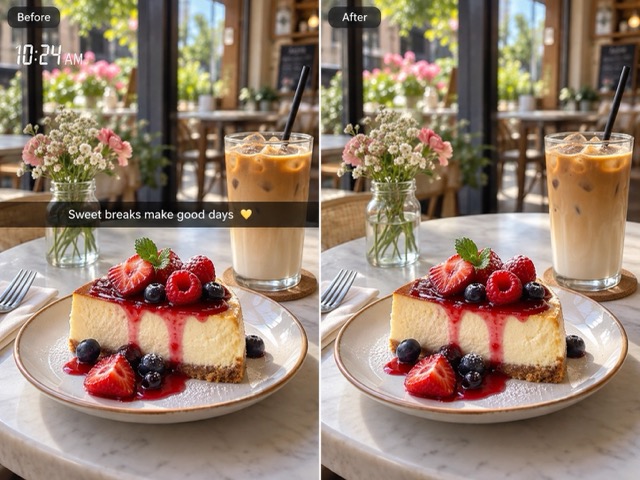
How to Use Snapchat Text Remover
Remove Snapchat text in three simple steps. Upload your saved Snapchat photo, click Generate, and download the clean result. The Snapchat text remover automatically detects unwanted captions, timestamps, location text, and text bars while rebuilding the covered background.

Upload Your Snapchat Photo
Upload a saved Snapchat photo, screenshot, or exported image with unwanted captions, timestamps, location labels, or text bars. A clear image helps the Snapchat text remover create a cleaner result.

Click Generate
Click Generate and let AI automatically remove Snapchat text and repair the covered areas. No manual selection or complicated editing is required.

Download Your Clean Photo
Preview the result and download your cleaned photo. Reuse it for social posts, albums, profile images, or new captions without the old Snapchat text.
Remove Snapchat Text Without Ruining the Photo
A useful Snapchat text remover should do more than erase letters. It should also repair the background underneath them. Use AI to remove Snapchat text, captions, timestamps, and text bars while protecting the details that make the original photo worth keeping.
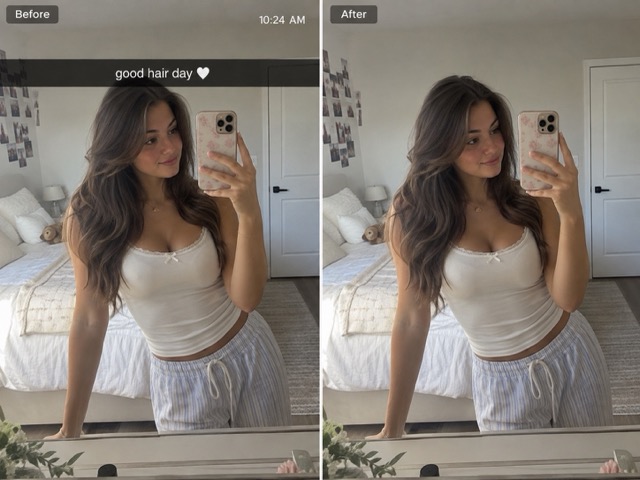
Remove Snapchat Captions and Text Bars
Captions are one of the most common reasons people search for a Snapchat text remover. A saved Snap may still look great even when the old caption no longer fits the context. Instead of cropping the top or center of the picture, use the Snapchat text remover to remove Snapchat caption text and reconstruct the covered area. This is especially useful for black or translucent caption bars placed over faces, clothes, walls, skies, or other backgrounds. The tool can also work as a Snapchat caption remover when you want to reuse an older photo with completely new text.
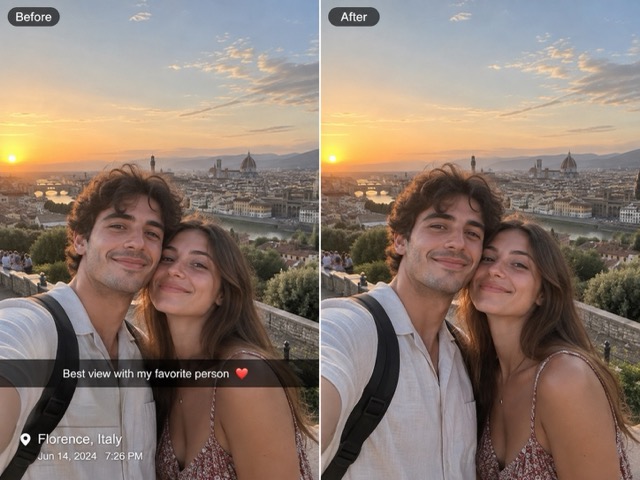
Remove Snapchat Timestamps and Location Text
Old timestamps, dates, time labels, and location names can make an otherwise useful photo feel dated. The Snapchat text remover helps clean these overlays while preserving the surrounding background. Use it to remove Snapchat timestamp text from travel photos, selfies, event pictures, or screenshots before reposting them somewhere else. If a location label sits over a building, sky, shirt, or other textured area, the Snapchat text remover can rebuild the selected region instead of simply blurring the words.
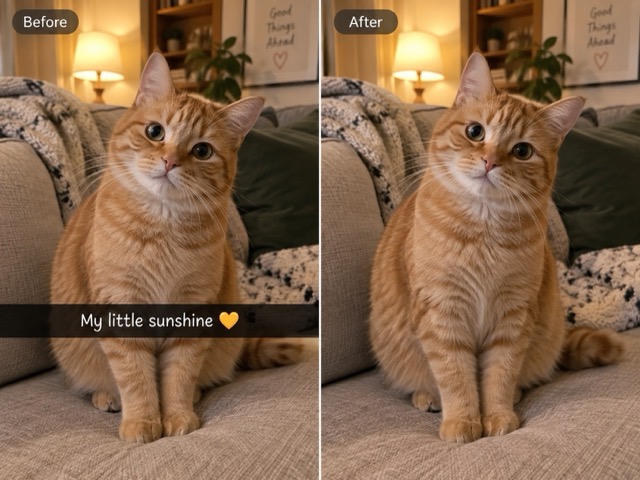
Repair the Background After Text Removal
Deleting letters is only half the job. When you remove Snapchat text from photo files, the pixels behind that text are no longer visible in the original image. The Snapchat text remover uses nearby visual information to create a natural replacement for the selected area. That can mean continuing a wall texture, extending the sky, rebuilding clothing, or restoring a simple background. The goal is a clean edit that does not look like someone placed a solid patch over the caption.
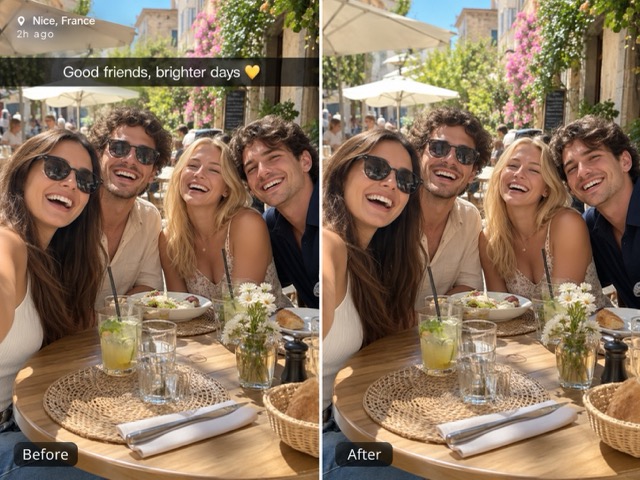
Keep Faces and Important Details Intact
Snapchat captions often overlap subjects, so careful removal matters. The Snapchat text remover is designed to focus on the selected overlay while keeping the rest of the image visually consistent. Use smaller selections around letters or caption bars when text touches a face, hairstyle, product, or detailed background. This makes the Snapchat text remover useful for portraits and social photos where preserving identity and composition is more important than simply deleting everything inside a large area.
Ways to Use Snapchat Text Remover
The Snapchat text remover is useful whenever text added to a saved Snap gets in the way of the original photo. Clean old captions, prepare pictures for reposting, remove timestamps, or create a reusable image before adding completely new text.
Clean Old Snapchat Photos Before Reposting
A photo can still be worth sharing long after its original Snapchat caption becomes irrelevant. Use the Snapchat text remover to remove Snapchat text from photo files before posting them on another platform. Clear away an old joke, comment, username-style text, or caption bar while keeping the people and scenery. After the Snapchat text remover cleans the image, you can reuse the photo with a new caption that fits the current context.
Remove Captions from Saved Selfies
Selfies often have captions sitting close to the face, hair, or clothing. A Snapchat caption remover can help recover a cleaner version without forcing you to crop the composition. Use the Snapchat text remover to remove Snapchat caption text, then review facial edges and other detailed areas before saving. The result can be reused for profile images, posts, collages, or personal photo collections.
Remove Dates and Location Labels from Travel Photos
Travel snaps frequently include dates, times, place names, or temporary text added during a trip. Use the Snapchat text remover to remove Snapchat timestamp elements and location text when you want the photo itself to become the focus again. Clean travel images can be reused in albums, blogs, social posts, slideshows, or printed collections without old overlays competing with the scenery.

Create a Clean Base for New Memes and Captions
Sometimes you do not want to remove text because it is ugly; you want to replace it with something new. The Snapchat text remover lets you clean the existing caption first so you can reuse the underlying photo. Remove Snapchat text, restore the background, and then add a new joke, quote, reaction, or message in another editor. This gives creators a cleaner base than stacking new words over an old caption.
A Faster Way to Clean Saved Snapchat Photos
See how creators, travelers, and photo editors can use Snapchat text remover to clean old captions, timestamps, and overlays from saved images.
I had several old pictures that I still liked, but the captions made them difficult to reuse. The Snapchat text remover gave me a much cleaner base without forcing me to crop half of the photo.
I had several old pictures that I still liked, but the captions made them difficult to reuse. The Snapchat text remover gave me a much cleaner base without forcing me to crop half of the photo.
I mainly use the Snapchat text remover for saved travel pictures with old location text. Removing the words makes the photos much easier to reuse in albums and posts.
I mainly use the Snapchat text remover for saved travel pictures with old location text. Removing the words makes the photos much easier to reuse in albums and posts.
The caption bar was covering part of my outfit, so cropping was not a good option. The Snapchat text remover let me clean that section while keeping the original framing.
The caption bar was covering part of my outfit, so cropping was not a good option. The Snapchat text remover let me clean that section while keeping the original framing.
I often need clean source images before adding new copy. Using a Snapchat text remover is much quicker than trying to clone the background manually for every old screenshot.
I often need clean source images before adding new copy. Using a Snapchat text remover is much quicker than trying to clone the background manually for every old screenshot.
I used the Snapchat text remover on a portrait with a timestamp near the edge. After cleaning it, the image looked much more suitable for a photo collection.
I used the Snapchat text remover on a portrait with a timestamp near the edge. After cleaning it, the image looked much more suitable for a photo collection.





Snapchat Text Remover FAQ
Learn how to remove Snapchat text, captions, timestamps, and text bars from saved photos while keeping the underlying image as clean as possible.
A Snapchat text remover is an image-editing tool designed to erase text overlays from saved Snapchat photos or screenshots. It can be used to remove Snapchat text such as captions, black text bars, dates, timestamps, location labels, and other unwanted words. After the text is detected, the Snapchat text remover attempts to reconstruct the covered area using surrounding visual information so the result looks more natural than simply painting over the letters.
Upload your saved image to the Snapchat text remover and click Generate. AI automatically detects unwanted Snapchat captions, text bars, timestamps, and location text, then creates a cleaner version of the photo. Once the result is ready, preview it and download the edited image.
Yes. That is one of the main reasons to use a Snapchat text remover or Snapchat caption remover. Cropping may remove important parts of the photo along with the caption. Instead, the Snapchat text remover can erase the unwanted caption and rebuild the area underneath it while keeping the original composition.
Yes. You can use the Snapchat text remover to remove Snapchat timestamp text, dates, time labels, and visible location text from saved images. AI detects the unwanted overlay and uses surrounding image details to rebuild the covered region for a cleaner result.
No tool can reliably recover pixels that were never preserved in the saved image. A Snapchat text remover does not reveal the exact hidden content behind a caption. Instead, AI estimates a plausible background based on the visible surroundings. This works especially well for skies, walls, clothing textures, floors, and simple scenery, but highly detailed objects hidden completely by text may be reconstructed rather than restored exactly.
Remove Snapchat Text and Keep the Photo
Do not crop a good photo just because an old caption is in the way. Use the Snapchat text remover to remove Snapchat text, captions, timestamps, location labels, and unwanted text bars while repairing the background underneath. Whether you need to remove Snapchat text from photo files before reposting, use a Snapchat caption remover for an old selfie, or remove Snapchat timestamp text from a travel picture, the Snapchat text remover gives you a simple way to create a cleaner version of the image.
