
AI Image Tools
Everything You Need to Edit Photos Faster
Open the PicEditor AI tools library for background removal, photo enhancement, object cleanup, face swap, upscaling, and more focused image workflows.

AI Blemish Remover
FLUX 3 Image Klein

Ideogram 4.5

AI Portrait Retouching

Snatched Waist Editor

AI Facial Expression Changer

AI Texture Generator

AI Nose Piercing Filter
Replace Object in Photo Online

Add Object to Photo

Eyeliner Filter

AI Bust Down Filter

Image Splitter

Add White Background to Photo

Snapchat Text Remover

Realistic AI Skin Generator

Add speech bubble to photo

Change Photo Background

AI Clothes Wrinkle Remover

AI LinkedIn Profile Picture

GPT Transparent BG Image Editor

Image to Layers

3D Angle Editor

Change Background of Photo
AI Object Eraser: Remove Unwanted Objects from Photos with AI
AI Object Eraser helps you clean photos by removing people, text, clutter, logos, wires, trash, and distractions. Upload an image, type what should disappear, generate, and get a natural photo with the background rebuilt around the removed area.
AI Object Eraser is made for quick photo cleanup when an otherwise perfect image has one distracting element. Instead of brushing every edge by hand, you can describe what to remove and let AI Object Eraser understand the target. Use AI Object Eraser to remove unwanted objects from photos while keeping the original style, lighting, background texture, and composition. AI Object Eraser also supports Free Online Object Remover searches because it combines easy prompts with reliable cleanup for everyday images.
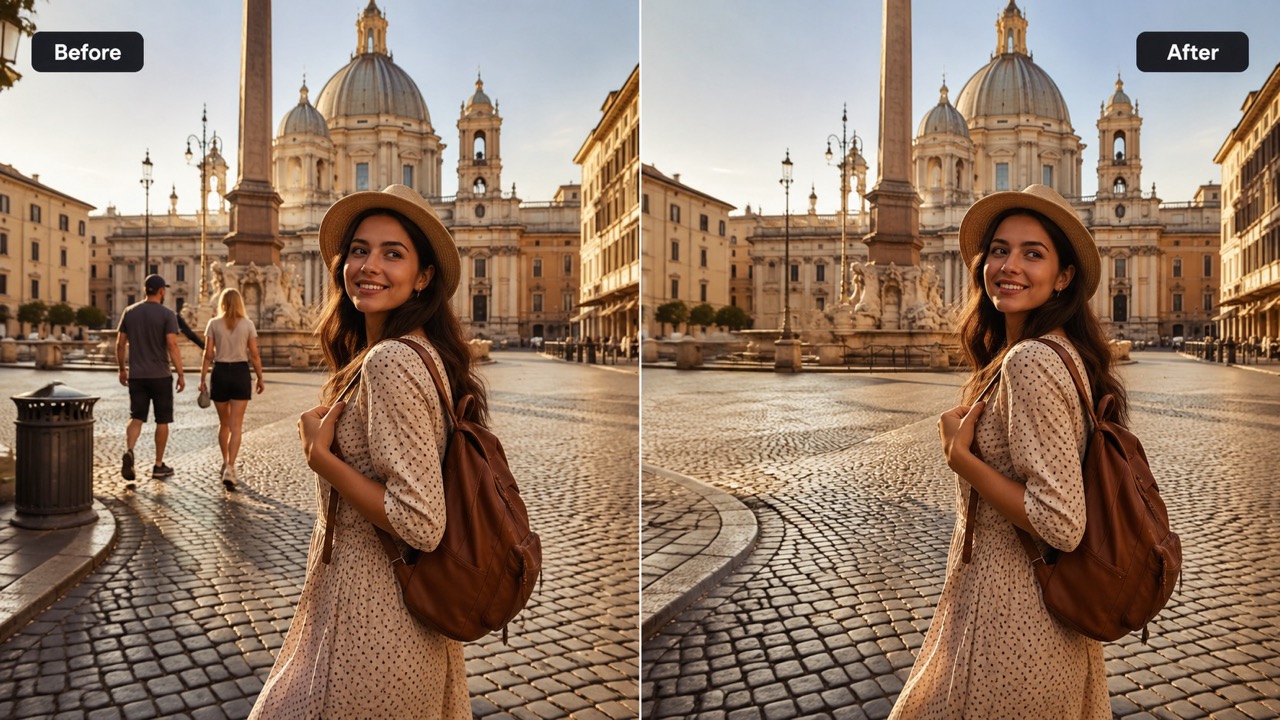
How to Use AI Object Eraser in 3 Simple Steps
AI Object Eraser follows the workflow shown in the editor: upload an image, write the removal request in the prompt box, click generate, and receive the edited photo. This flow makes Remove Object from Photo tasks simple for portraits, product images, travel shots, and social posts. AI Object Eraser keeps the process direct, so anyone can Remove Object from Photo without learning complex editing terms.

Upload Your Reference Image
Start AI Object Eraser by uploading the photo you want to clean. Drag and drop an image or click to select one from your device or library. Clear photos help AI Object Eraser recognize the scene and prepare a cleaner edit.

Write What You Want to Remove
In the prompt box, type a simple instruction such as remove the person in the background, remove the trash can, or remove the text on the wall. AI Object Eraser works as a prompt-based AI Object Remover, so specific wording helps it find the right object.

Click Generate and Get the Clean Image
Click Generate Image and AI Object Eraser will remove the selected distraction, rebuild the hidden background, and return a clean result. Review the generated photo, then save the version that looks most natural.
Why AI Object Eraser Creates Cleaner Photo Edits
AI Object Eraser focuses on practical cleanup: understanding the object you name, removing it accurately, and restoring the background so the result does not look edited. It is a Free Online Object Remover experience made for speed, clarity, and natural image repair. AI Object Eraser is ideal for Remove Object from Photo needs where speed and accuracy both matter.
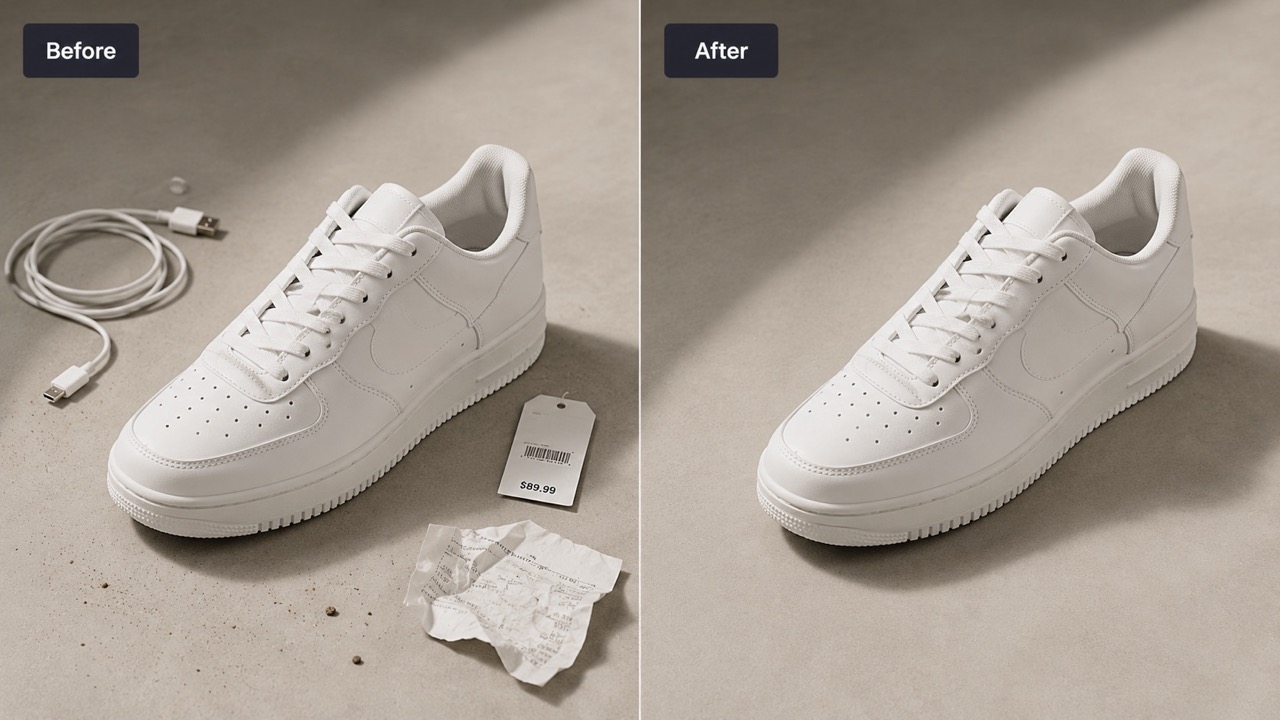
Remove Distractions Without Manual Masking
AI Object Eraser is built for people who want a clean image without tracing outlines or painting masks. Describe the unwanted item and AI Object Eraser focuses on that target. The AI Object Remover can handle background clutter, small objects, signs, cables, and accidental items that ruin a composition. For anyone searching Remove Object from Photo or Erase Objects from Photos, this prompt-first workflow is faster than traditional editing and easier for beginners. AI Object Eraser also works well when you need an AI Object Remover for simple fixes that should look invisible.
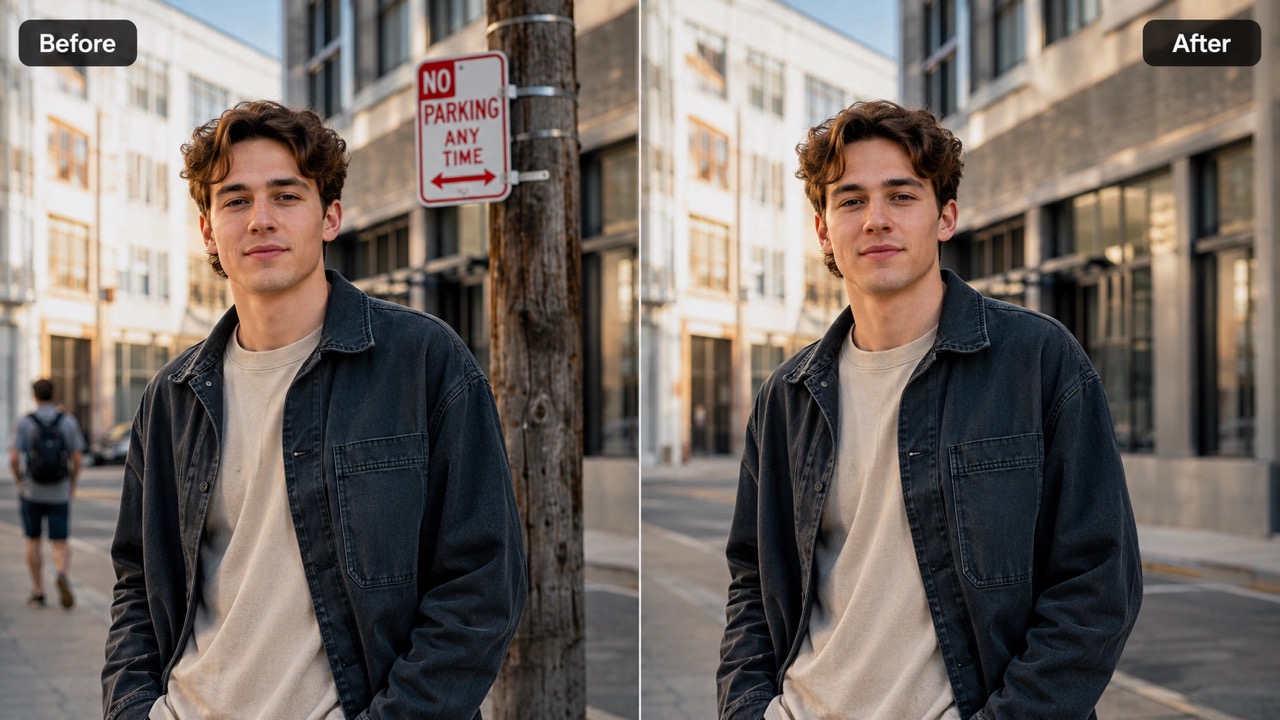
Rebuild Backgrounds with Natural Detail
After removal, AI Object Eraser fills the empty area with context-aware detail. It looks at nearby texture, lighting direction, shadows, perspective, and depth so the edit blends into the original photo. A good Magic Eraser should not leave a blurry hole or repeated pattern. AI Object Eraser is useful when you need to remove unwanted objects from photos and keep the final image realistic enough for sharing, listings, portfolios, and everyday memories. AI Object Remover quality matters most in these moments, and Magic Eraser convenience helps users finish edits without extra tools.
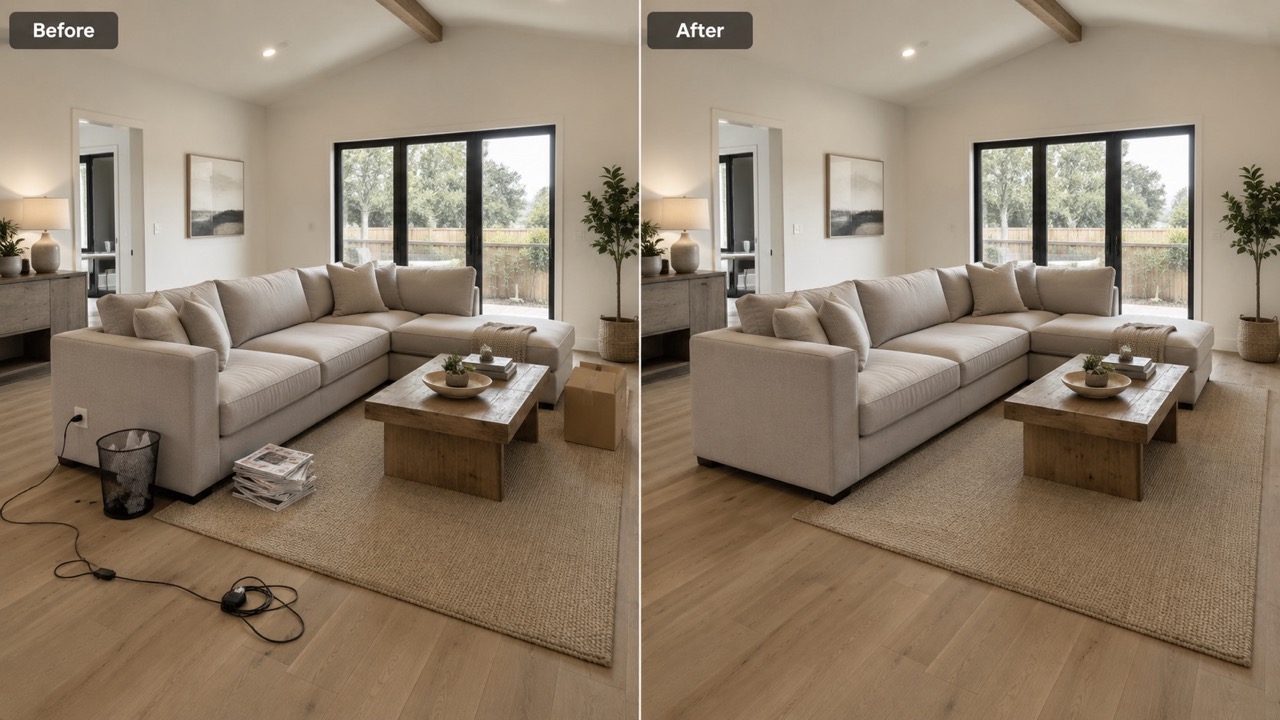
Clean People, Text, Logos, and Clutter
AI Object Eraser supports many real cleanup needs: remove a passerby from a travel photo, remove text from a screenshot-style image, remove a logo from a mockup you own, or remove clutter from a product scene. AI Object Remover and Magic Eraser workflows are most useful when the request is direct. With AI Object Eraser, you can Erase Objects from Photos by typing exactly what should disappear. AI Object Eraser can also serve as a Magic Eraser for quick social edits and a practical AI Object Remover for daily cleanup.
Who Uses AI Object Eraser?
AI Object Eraser is useful for creators, sellers, travelers, photographers, real estate teams, students, and anyone who wants a cleaner image. Whether you need AI Object Remover accuracy, Magic Eraser simplicity, or Free Online Object Remover convenience, the goal is the same: remove distractions and keep the photo natural. AI Object Eraser also helps users remove unwanted objects from photos for resumes, thumbnails, profile pictures, and presentations.

Travel Photos with Unwanted People
Busy streets, beaches, museums, and landmarks often include strangers in the frame. AI Object Eraser helps remove unwanted objects from photos, including people in the background, without changing the memory you wanted to keep. Use AI Object Eraser as a Magic Eraser for cleaner vacation shots and more focused storytelling. AI Object Eraser gives those images a calmer look without removing the travel atmosphere.

Product Photos for Online Selling
Small distractions can make a product image look messy. AI Object Eraser can remove dust, props, labels, wires, reflections, or background clutter that pulls attention away from the item. For sellers who need a Free Online Object Remover, AI Object Eraser provides a quick way to polish images before publishing. AI Object Remover accuracy is especially helpful when product edges, shadows, and surface textures must remain believable.

Portraits and Social Media Images
A great portrait can be weakened by a sign, pole, bag, chair, or random object behind the subject. AI Object Eraser acts like a careful AI Object Remover that keeps the person and scene intact. Use Magic Eraser style editing to Remove Object from Photo results while preserving expression, lighting, and composition. AI Object Eraser is a good choice when you want Magic Eraser simplicity with more control from a written request.

Real Estate and Interior Photos
Interior photos often include cords, bins, small stains, personal items, or clutter that distracts from the room. AI Object Eraser helps clean these visual interruptions while keeping walls, floors, furniture, and lighting consistent. For agents and hosts, AI Object Eraser makes Erase Objects from Photos tasks faster and more approachable. AI Object Remover results can make a room feel tidier while still looking honest and natural.
What Users Say About AI Object Eraser
Users choose AI Object Eraser when they want practical cleanup, not complicated editing. These reviews show how AI Object Remover precision, Magic Eraser speed, and natural background repair help make everyday photos cleaner. AI Object Eraser is valued because the prompt box makes AI Object Remover tasks easier to explain.
I used AI Object Eraser on a beach photo where two people were walking behind me. I typed what to remove, generated the result, and the sand looked natural. It felt like a Magic Eraser that understood my instruction instead of forcing me to paint every detail. AI Object Eraser saved the photo without making the edit obvious.
I used AI Object Eraser on a beach photo where two people were walking behind me. I typed what to remove, generated the result, and the sand looked natural. It felt like a Magic Eraser that understood my instruction instead of forcing me to paint every detail. AI Object Eraser saved the photo without making the edit obvious.
My product photos had cables and a small label in the background. AI Object Eraser cleaned both without changing the product. As a Free Online Object Remover, it helped me prepare images quickly and made my listings look more professional. AI Object Remover results kept the background realistic.
My product photos had cables and a small label in the background. AI Object Eraser cleaned both without changing the product. As a Free Online Object Remover, it helped me prepare images quickly and made my listings look more professional. AI Object Remover results kept the background realistic.
I searched Remove Object from Photo because I needed to fix a portrait with a pole behind my shoulder. AI Object Eraser removed it and rebuilt the background better than I expected. The AI Object Remover result looked clean enough to post right away. AI Object Eraser made the whole process feel simple.
I searched Remove Object from Photo because I needed to fix a portrait with a pole behind my shoulder. AI Object Eraser removed it and rebuilt the background better than I expected. The AI Object Remover result looked clean enough to post right away. AI Object Eraser made the whole process feel simple.
I like that AI Object Eraser uses a prompt box. I can write remove the chair on the left or remove the text on the sign, and it follows the request. For Erase Objects from Photos tasks, Magic Eraser editing feels much easier this way. AI Object Eraser is now my first choice to Erase Objects from Photos.
I like that AI Object Eraser uses a prompt box. I can write remove the chair on the left or remove the text on the sign, and it follows the request. For Erase Objects from Photos tasks, Magic Eraser editing feels much easier this way. AI Object Eraser is now my first choice to Erase Objects from Photos.


FAQs About AI Object Eraser
These quick answers explain how AI Object Eraser works, what to type, and how to get cleaner Magic Eraser style results with simple instructions. AI Object Remover guidance makes Magic Eraser results more predictable.
AI Object Eraser is a photo cleanup tool that removes the object you describe and fills the area with a natural-looking background. AI Object Eraser is designed for natural photo repair.
Upload your image, write what you want to remove in the prompt box, click Generate Image, and review the cleaned result. AI Object Eraser then returns the edited image.
You can remove people, text, logos, wires, trash, signs, clutter, blemishes, and other visible distractions from many photos. AI Object Remover prompts work best when the object is described clearly.
Use clear language. For example, write remove the person in the background or remove the red trash can on the right. This helps AI Object Eraser target the correct area.
AI Object Eraser works best when the target object is visible and the surrounding background has enough detail for reconstruction. Magic Eraser style cleanup improves when the background is not too complex.
Remove watermarks only from images you own or have permission to edit. Respect copyrights and usage rights. AI Object Eraser should be used responsibly.
Clean Your Photo with AI Object Eraser
Use AI Object Eraser to remove unwanted objects from photos in a few simple steps.
