
AI Image Tools
Everything You Need to Edit Photos Faster
Open the PicEditor AI tools library for background removal, photo enhancement, object cleanup, face swap, upscaling, and more focused image workflows.
FLUX 3 Image Klein
Ideogram 4.5

AI Portrait Retouching

Snatched Waist Editor

AI Facial Expression Changer

AI Texture Generator

AI Nose Piercing Filter

Replace Object in Photo Online

Add Object to Photo

Eyeliner Filter

AI Bust Down Filter

Image Splitter

Add White Background to Photo

Snapchat Text Remover

Realistic AI Skin Generator

Add speech bubble to photo

Change Photo Background

AI Clothes Wrinkle Remover

AI LinkedIn Profile Picture

GPT Transparent BG Image Editor

Image to Layers

3D Angle Editor

Change Background of Photo
Add Text to Image
Create Your Next Visual With Seedream 5 Flash AI
A Seedream Image Generator For Ideas Worth Seeing
Bring a half-formed idea into focus with Seedream 5 Flash AI. Start with a written description, or give the Seedream image generator a photo and explain what should change. Explore a product setting, a fresh composition, an editorial scene, or a distinctive illustration without having to describe every brushstroke. Seedream 5 Flash AI connects image creation and image editing in one model, giving your next visual a practical starting point. Make the subject clear, choose a direction, and refine the result around the details that matter to you. A strong brief gives Seedream 5 Flash AI a purpose and the Seedream image generator a clear visual target.
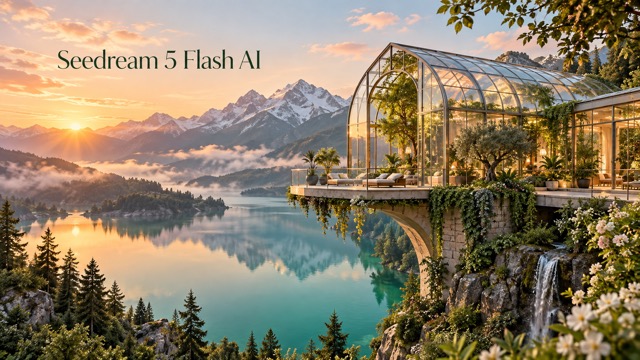
How To Create With Seedream 5 Flash AI
A useful image starts with a clear brief. Follow these four steps to guide Seedream 5 Flash AI from your first idea to a result you can evaluate. The Seedream image generator responds to visual direction, so describe your intended outcome and keep each revision focused. With Seedream 5 Flash AI, treat the Seedream image generator as a place to test deliberate creative choices.

Start With Words Or A Reference
Open Seedream 5 Flash AI and choose text creation or image editing. For a new scene, describe the main subject and setting. For an edit, upload a clear reference that shows the object, person, or arrangement you want to preserve. Give the Seedream image generator relevant visual information rather than several unrelated pictures. If you use multiple references, explain the role of each one: subject, environment, material, or style. A concise starting brief makes later decisions easier.

Describe The Result You Want
Tell Seedream 5 Flash AI about composition, lighting, color, material, and mood in a natural sentence. For example, request a cream ceramic bottle on a peach pedestal with soft afternoon shadows and space for a headline. Ask the Seedream image generator to preserve any essential silhouette or product detail. Separate the changes you want from the details that should remain. Avoid conflicting instructions such as asking for both a tightly cropped close-up and a spacious panoramic view.

Generate A Focused First Version
Run Seedream 5 Flash AI with a brief that has one clear goal. Let the first result answer a specific creative question: does this setting suit the product, does this palette feel right, or does the composition communicate the idea? The Seedream image generator is more useful when you evaluate the result against that question. Start with a manageable scene, then add complexity once the central direction works. Use the output settings actually offered in the generator.

Review Details And Refine
Review the result from Seedream 5 Flash AI at a useful viewing size. Check shapes, contact shadows, small details, and any requested text before choosing your next step. Keep a promising image as your reference and ask the Seedream image generator for one targeted change. Try a warmer light, a simpler background, or more space around the subject. Save the versions that answer your brief, and compare them by clarity and usefulness instead of changing every variable at once.
Explore The Creative Range Of Seedream 5 Flash AI
Seedream 5 Flash AI brings text generation and reference-based editing into the same creative process. Use the Seedream image generator to develop a scene, adjust an existing picture, or explore a different arrangement. The comparisons below are AI-generated concept illustrations of these workflows, not verified outputs or performance benchmarks from the named model. Give Seedream 5 Flash AI a specific task so the Seedream image generator has a useful direction to follow.

Seedream 5 Flash AI For Product Concepts
Turn a simple visual brief into a considered product setting. Seedream 5 Flash AI can generate an image from text or reinterpret a supplied reference, giving you a way to explore surfaces, backgrounds, and lighting before choosing a direction. Ask the Seedream image generator for a restrained studio composition, a tactile lifestyle environment, or a more imaginative campaign scene. Specify the product placement and the space that surrounding copy will need. For reference edits, describe the details that must remain recognizable, including shape, color, and key material cues. Seedream 5 Flash AI makes iteration approachable, while your review keeps the result aligned with the actual product. Treat the image as a creative proposal and check fine details before using it in a finished layout.

Seedream 5 Flash AI For Targeted Changes
A useful revision often changes one element while protecting the rest of the image. Seedream 5 Flash AI supports image editing, and the official model documentation describes position guidance through coordinates, boxes, arrows, and other markers. In a practical brief, identify the object and the change clearly: replace the blue vase with a terracotta vase while retaining the sofa, window, and viewpoint. The Seedream image generator then has a more specific task than a broad request to improve everything. Marker-based controls depend on the interface; this page focuses on the text and image inputs available here. Use Seedream 5 Flash AI to explore a local change, then check surrounding textures, shadows, and boundaries for unintended differences.
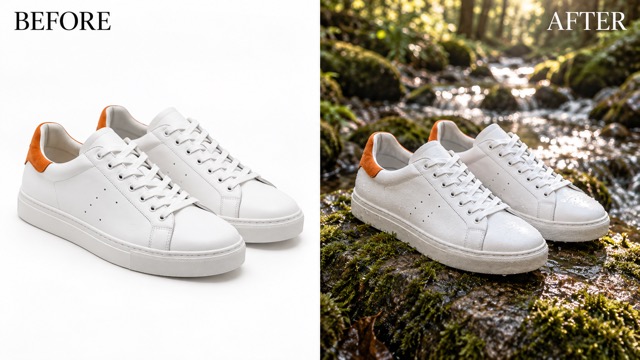
Seedream 5 Flash AI For Reference-Led Scenes
References can communicate information that is difficult to express in words alone. Seedream 5 Flash AI accepts image references at the model level, including workflows that combine several inputs into one result. Give the Seedream image generator a clear explanation of which reference supplies the subject and which supplies the setting or visual treatment. A shoe photograph might anchor the product while a woodland reference suggests the environment. Request believable scale, perspective, and contact shadows so the new scene feels physically connected. Seedream 5 Flash AI does not remove the need to inspect product geometry or identity details. Start with the minimum references needed, use the upload options available on this page, and refine the strongest composition.
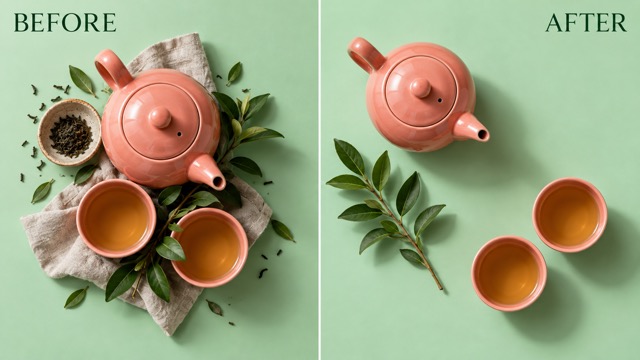
Seedream 5 Flash AI For Layout Exploration
Explore how the same objects can support a clearer composition. Seedream 5 Flash AI can help you test spacing, background treatment, visual hierarchy, and alternate arrangements through image generation and editing. Ask the Seedream image generator to keep a recognizable subject while opening room for a headline or simplifying surrounding props. The official model also supports decomposing an image into a base and independent layers through its dedicated workflow; that capability is separate from the standard generator on this page. Here, use Seedream 5 Flash AI to develop a revised image composition, then bring your chosen result into your usual design process. Compare the versions at the size your audience will actually see.
Put Seedream 5 Flash AI To Work
Choose a creative task with a clear audience and a concrete deliverable. Seedream 5 Flash AI can support early exploration and focused revisions across different visual projects. Use the Seedream image generator as part of a workflow that includes your own selection, editing, and final quality review. Return to Seedream 5 Flash AI whenever a new brief gives your Seedream image generator workflow a fresh purpose.
Product And Storefront Visuals
Use Seedream 5 Flash AI to explore background ideas for a product launch, seasonal collection, or storefront feature. Keep the product description specific and request lighting that makes its material easy to read. The Seedream image generator can help you compare a clean studio scene with a warmer lifestyle direction. Review packaging, proportions, and essential features against the real item. Build a consistent visual brief before creating additional concepts for the same collection.

Social Campaign Concepts
Give a social post one strong visual idea. Seedream 5 Flash AI can help develop an arresting scene, a recognizable color story, or a reference-based variation for a campaign. Tell the Seedream image generator where the subject should sit and where your final caption or branding will go. Judge the result at mobile size, where crowded details quickly lose impact. Keep the composition focused and carry the successful palette into your next brief.

Editorial And Story Illustrations
Explore an atmosphere before committing to a finished illustration. Seedream 5 Flash AI can turn a description of place, weather, character, and light into a visual direction for a story or editorial project. Use the Seedream image generator to compare a quiet realistic scene with a more stylized interpretation. Describe the important relationships between objects and leave less important details flexible. Select the version that communicates the story clearly, then refine continuity and composition.

Brand And Presentation Exploration
Use Seedream 5 Flash AI when a team needs something concrete to discuss. Create an opening slide visual, a concept board image, or a new arrangement for an existing asset. The Seedream image generator gives the discussion a visible starting point, while your brief keeps it connected to the message. Specify the mood and available space rather than requesting generic polish. Review the image alongside the surrounding typography and other brand materials before final selection.
Creative Perspectives On Seedream 5 Flash AI
These are illustrative creative scenarios, not verified customer reviews or measured results. They show how different roles might approach Seedream 5 Flash AI and what each person would ask the Seedream image generator to help explore.
With Seedream 5 Flash AI, I would start by comparing two backgrounds for the same bottle. The Seedream image generator would help me explore the setting, while my review would focus on whether the product still looks accurate.
With Seedream 5 Flash AI, I would start by comparing two backgrounds for the same bottle. The Seedream image generator would help me explore the setting, while my review would focus on whether the product still looks accurate.
I would use Seedream 5 Flash AI to make an abstract campaign idea easier to discuss. A first image could help the team agree on color and mood before we spend time refining the smaller visual details.
I would use Seedream 5 Flash AI to make an abstract campaign idea easier to discuss. A first image could help the team agree on color and mood before we spend time refining the smaller visual details.
For a story concept, I would give Seedream 5 Flash AI a specific setting and time of day. The Seedream image generator could help me explore atmosphere while I choose the version that best supports the narrative.
For a story concept, I would give Seedream 5 Flash AI a specific setting and time of day. The Seedream image generator could help me explore atmosphere while I choose the version that best supports the narrative.
I would ask Seedream 5 Flash AI to simplify a busy composition and leave room for a headline. My next decision would be whether the image works with the actual typography, rather than whether it looks impressive alone.
I would ask Seedream 5 Flash AI to simplify a busy composition and leave room for a headline. My next decision would be whether the image works with the actual typography, rather than whether it looks impressive alone.
I would use Seedream 5 Flash AI to explore one clear idea for a small screen. The Seedream image generator could suggest a visual direction, and I would check that the main subject remains readable at feed size.
I would use Seedream 5 Flash AI to explore one clear idea for a small screen. The Seedream image generator could suggest a visual direction, and I would check that the main subject remains readable at feed size.
Seedream 5 Flash AI would give me a starting point when I know the mood but not the composition. I would keep the strongest result, change one detail, and compare the next version against the original intention.
Seedream 5 Flash AI would give me a starting point when I know the mood but not the composition. I would keep the strongest result, change one detail, and compare the next version against the original intention.



Seedream 5 Flash AI Questions Answered
Understand the model, the practical workflow, and the limits of this page before you begin. These answers distinguish documented Seedream image generator capabilities from interface options and claims that would require direct testing. Your Seedream image generator brief should reflect the result you actually need.
Seedream 5 Flash AI is the page name used here for ByteDance's Seedream 5.0 Flash image model. It supports creating images from text and editing with image references. BytePlus positions Flash for lower latency and lower cost than Pro, while Pro prioritizes image quality. The Seedream image generator is useful for exploring visual directions and making focused revisions. This page does not promise a fixed completion time, a particular benchmark score, or a guaranteed result for every prompt.
Official documentation lists 1K, 1.5K, and 2K output tiers for Seedream 5.0 Flash, with PNG and JPEG output at the model level. Seedream 5 Flash AI on PicEditor uses the settings offered by the current generator. Choose among the controls actually displayed rather than assuming every API parameter has a matching button. After using the Seedream image generator, inspect the downloaded image dimensions and small details against your intended layout. Higher resolution alone does not resolve an unclear brief or inaccurate content.
Yes. Seedream 5 Flash AI supports text-to-image and image-to-image workflows. Official model documentation allows up to ten reference images for image generation, while the upload controls on a hosting service can differ. Give the Seedream image generator a clear role for each reference and identify the features you want preserved. Avoid treating the reference limit as a requirement to use many pictures. A small, coherent set often makes the creative instruction easier to communicate and the resulting changes easier to evaluate.
The official model supports editing guided by positions or visual markers, and a dedicated decomposition workflow can produce one base image plus up to sixteen independent layers. Those are model capabilities, not a promise that this page includes a layer editor or coordinate controls. The Seedream image generator here is configured for text and image creation. If you need independently editable layers, use a service or workflow that explicitly exposes that feature. Review local edits carefully even when the instruction is precise.
Official documentation describes native multilingual generation for Seedream 5 Flash AI, including languages such as French, German, Spanish, Japanese, Korean, and Arabic. Give the Seedream image generator the exact wording and keep the requested layout straightforward. Always proofread the result, especially small text, punctuation, numbers, and unfamiliar scripts. For essential branding or long passages, consider adding final typography in a dedicated design editor. Multilingual support expands the creative possibilities; it does not make every generated letter automatically correct.
State the subject, setting, composition, and lighting first, then identify the most important constraints. Use Seedream 5 Flash AI with a clear reference when you need an existing subject to remain recognizable. Ask the Seedream image generator for one meaningful revision at a time and compare it with your brief. Check text, anatomy, object shapes, and shadows before using the image. The illustrations on this page were generated as concept visuals with a separate image tool and should not be treated as model benchmarks.
Bring Your Idea Into View With Seedream 5 Flash AI
Start with a scene you can describe or a reference you want to develop. Seedream 5 Flash AI gives your creative direction a visual starting point, and the Seedream image generator helps you explore what comes next. Choose a clear subject, make one purposeful request, and review the result with your final audience in mind. Let Seedream 5 Flash AI and the Seedream image generator turn that next question into a visual experiment.
